
Why Is ChatGPT So Slow? The Real Causes and Fastest Fixes in 2026

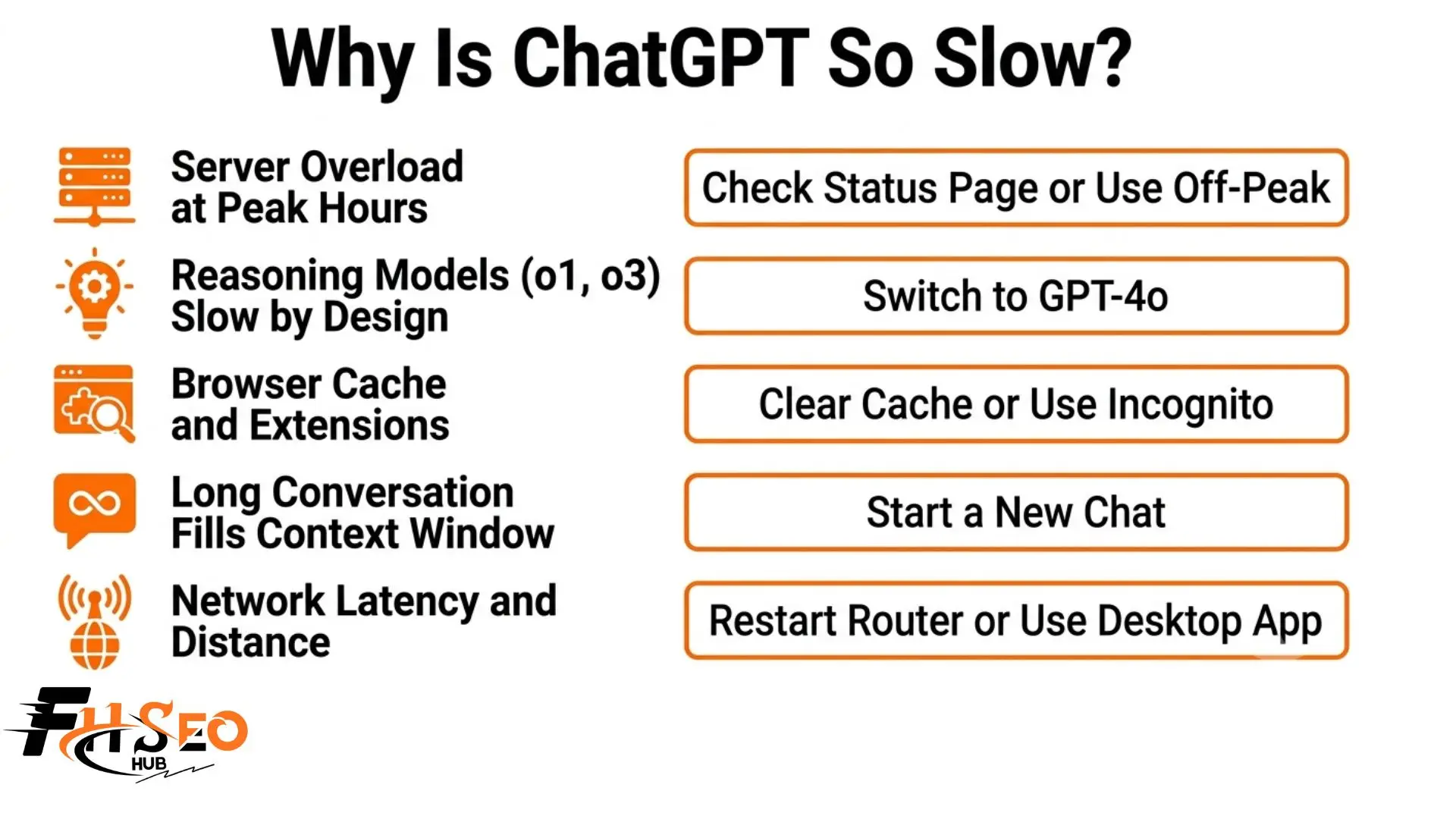
If you are wondering why is ChatGPT so slow, it usually comes down to five reasons that stack together: OpenAI server overload during peak hours, shared GPU resources creating inference latency, your browser adding rendering overhead on top of token streaming, the growing context window as your conversation gets longer, and network latency between your device and OpenAI’s data centers. Once you know which one is hitting you, the fix takes seconds.
Most people blame OpenAI and just wait it out. But slowness is usually fixable, and it is rarely just one thing. You might have fast internet and still lag because of an ad blocker. You might pay for Plus and still wait because your conversation is too long. This guide walks through every cause and the exact fix.
Why Is ChatGPT So Slow Right Now?
ChatGPT slowness almost never has a single answer. It is a stack of causes layered on top of each other.
On the server side, OpenAI runs real hardware with real limits. When millions of people use ChatGPT at once, shared GPU resources get queued through resource contention and your response time climbs. On your side, your browser adds JavaScript rendering overhead, your network adds latency, and your conversation length forces the model to process more text before every reply. Most fixes fail because people apply a browser fix to a server problem. Match the fix to the cause and the lag disappears.
Is ChatGPT Slow for Everyone Right Now or Just Me?
Check the OpenAI status page at status.openai.com first. If it shows incidents, the slowdown is server-wide and no local fix helps. If the page shows green but ChatGPT is still slow, the cause is regional server congestion, your network latency, or your browser cache. Test it on a different device to confirm which side the problem is on.
Why Does ChatGPT Slow Down During Peak Hours?
Between 7 and 9 PM EST, millions of users hit OpenAI’s servers at the same time. Shared GPU resources get queued through resource contention, and the system cannot process every request instantly when server throughput is maxed out.
Traffic spikes make this worse. When a major news story breaks or a topic trends, people rush to ChatGPT at once and everyone’s response time slows together. This is genuine server congestion, not your setup. Using ChatGPT early morning or late at night feels faster because server load is lighter.
Why Does ChatGPT Get Slower Right After a Model Update?
Every major OpenAI model release drives a surge of new users within hours. That spike overwhelms server infrastructure before OpenAI can scale GPU capacity to match demand. The slowdown is not a bug. It is a predictable infrastructure adjustment lag that usually resolves within 48 to 72 hours. If ChatGPT suddenly slowed right after a big release, that is almost always why.
Why Is ChatGPT’s o1 or o3 Model So Much Slower Than GPT-4o?
The o1, o3, and o4-mini models run an internal extended thinking mode before producing any visible text. The delay is intentional and built into the design.
These reasoning models build a full reasoning chain silently before streaming a single token. What looks like server lag or a frozen screen is the model working through complex logic before it outputs anything. If you do not need deep reasoning, switch to GPT-4o and the same question answers in a fraction of the time.
How Does ChatGPT 5 Fast Mode vs Thinking Mode Affect Speed?
ChatGPT 5 gives you two response paths, and choosing the right one is the most impactful speed control available today.
For most daily work, Fast mode is all you need. Save Thinking mode for complex problems where the extra depth earns the wait.
Which ChatGPT Model Is the Fastest in 2026?
GPT-3.5 is the fastest raw output model for simple tasks. GPT-4o delivers the best balance of speed and quality. The o1 and o3 reasoning models are intentionally the slowest because of extended thinking mode.
| Model | Relative Speed | Cause | Best Use Case |
| GPT-3.5 | Fastest | Lightweight inference | Simple quick tasks |
| GPT-4o | Fast | Optimised inference | Most everyday tasks |
| ChatGPT 5 Fast mode | Very fast | Streamlined output path | Speed-critical work |
| GPT-4 | Moderate | Heavier inference | Quality-first tasks |
| ChatGPT 5 Thinking mode | Slow | Full reasoning chain | Deep analysis |
| o1 model | Slow by design | Extended thinking mode | Complex reasoning |
| o3 model | Slowest by design | Full internal reasoning | Advanced multi-step logic |
Why Does ChatGPT Type One Word at a Time Instead of Sending the Full Answer?
ChatGPT uses token streaming to send each word as it generates rather than waiting to finish the whole response. This deliberate design makes the conversation feel natural.
Here is what matters: the actual inference latency, meaning the total time to generate the complete response, is often much shorter than it looks. The word-by-word display is just the delivery mechanism. When ChatGPT feels like it is generating slowly, the model may have already finished the hard work and you are watching the stream catch up. Real slowness is a frozen cursor, not the visible flow of a normal response.
How Does Your Browser Make ChatGPT Slower Than It Actually Is?
Even when OpenAI’s servers are fast, your browser can drag everything down. ChatGPT’s web interface relies on JavaScript rendering, a WebSocket connection, and constant DOM updates to stream each token. Several browser-side issues pile on top of actual response speed:
A fast server response still looks slow inside a bloated browser. Browser problems are the easiest to fix.
Does Clearing Browser Cache and Cookies Fix ChatGPT Lag?
Yes. Outdated or corrupted browser cache forces ChatGPT to reload degraded data on every request. Clearing it is the most effective first fix when ChatGPT suddenly slows down after working fine.
Here is how in under a minute:
- Open browser settings. In Chrome, Firefox, or Edge click the menu icon. In Safari click Preferences
- Go to Privacy and Security, then Clear browsing data
- Tick both “Cached images and files” and “Cookies and other site data”
- Set the time range to All time and click Clear data
- Reopen ChatGPT and sign back in to test the difference
Do Browser Extensions Like Ad Blockers Slow Down ChatGPT?
Yes. Ad blockers, grammar checkers, and script filters intercept ChatGPT’s WebSocket connection and JavaScript rendering on every token delivery. Each one adds overhead that compounds during long responses and code generation.
The fastest test is incognito mode. Open ChatGPT in a private window, which disables most extensions by default. If it suddenly flies, you found your culprit. Then enable extensions one by one until the slow one reveals itself.
Why Is ChatGPT Faster in the Desktop App Than in a Browser?
The ChatGPT desktop app and iOS app skip browser overhead entirely. They do not share memory with other tabs, do not load extensions, and are not affected by browser memory leaks. If your slowdown survives clearing cache and disabling extensions, switch to the official app. For many users with stubborn browser lag, the app resolves it instantly.
Can Your Internet Connection Make ChatGPT Slow Even When Wi-Fi Feels Fine?
Yes. ChatGPT needs stable round-trip connectivity for every token it streams through a WebSocket connection. Even small network latency spikes break the stream and create those visible pauses mid-response.
You need at least 10 Mbps download and 2 Mbps upload to keep token streaming smooth. Run a quick test at speedtest.net. If your numbers are low, restart your router, switch from Wi-Fi to wired Ethernet, or try your phone’s hotspot. If ChatGPT speeds up on the hotspot, your Wi-Fi was the bottleneck.
Does a VPN Make ChatGPT Faster or Slower?
A VPN almost always makes ChatGPT slower because it adds an extra routing hop between your device and OpenAI’s servers. The rare exception is when your provider routes traffic inefficiently to OpenAI’s data centers, where a VPN pointed at a US server can occasionally help. When troubleshooting, disable your VPN first and test.
Why Is ChatGPT Slower for Users Outside the United States?
OpenAI’s primary data centers sit in the United States. Every request from users in Asia, Europe, the Middle East, or Africa travels thousands of miles to reach the inference servers and thousands back. This geographic latency adds baseline response time that no browser fix, router restart, or VPN trick can fully eliminate. It is a structural limitation of physical distance, not a problem with your setup.
Why Does ChatGPT Get Slower the Longer Your Conversation Gets?
ChatGPT re-reads your entire chat history before generating each new response to keep context. As your conversation length grows, the text the model processes before every reply grows with it. Once the context window approaches its limit, inference latency climbs noticeably. A chat that felt instant at message five feels sluggish by message fifty. The fix: ask ChatGPT to summarize the thread, copy the summary, start a new chat, and paste it in.
Does the ChatGPT Memory Feature Make Responses Slower?
Yes, when ChatGPT Memory is enabled, the model retrieves and processes your stored memory entries before generating every response, even in a brand new conversation. This hidden context adds tokens to every request you cannot see, creating added inference latency with no visible explanation. If your fresh chats feel slow, go to Settings and turn off Memory. It is one of the most overlooked speed fixes in 2026.
Does Upgrading to ChatGPT Plus Make It Faster?
ChatGPT Plus gives paid subscribers priority access to server resources during peak hours, when free tier users get queued through resource contention. But upgrading only helps if your bottleneck is the server queue. If your slowdown comes from browser cache, network latency, a long context window, or ChatGPT Memory, paying for Plus will not fix it. If ChatGPT is only slow during peak hours, Plus is worth it.
How Do You Fix ChatGPT Running Slow? The Complete Fix Sequence
Work through these in order. Each one targets a different layer of the speed problem.
- Check the OpenAI status page. If servers are struggling, no local fix helps. Wait it out.
- Open incognito mode. This disables extensions. If speed jumps, an ad blocker is your problem.
- Clear browser cache and cookies. This fixes sudden unexplained slowdowns fast.
- Restart your router. This clears routing glitches and resets your connection.
- Start a new chat. This resets the context window. Often the single fastest fix for long threads.
- Switch models. Move from o1 or o3 to GPT-4o, or pick ChatGPT 5 Fast mode for speed.
- Disable ChatGPT Memory. This removes hidden context added to every request.
- Use the desktop app. This bypasses browser bloat entirely.
- Enable hardware acceleration. This lets your GPU smooth out the token streaming display.
Final Thoughts
Figuring out why is ChatGPT so slow comes down to matching the fix to the actual cause instead of guessing. Server slowdowns need patience or off-peak timing. Browser slowdowns need a cache clear or the desktop app. Model slowdowns need a switch to GPT-4o. Long-conversation lag needs a fresh chat. Run through the fix sequence in order and you will find the cause in minutes.
FAQs
Rising global demand strains OpenAI’s GPU resources, more people use reasoning models like o1 and o3 that are slow by design, and longer conversations fill the context window. Check the status page, clear cache, switch to GPT-4o, and disable Memory.
No. ChatGPT has not degraded, but heavier reasoning models and growing demand make it feel slower than the GPT-3.5 era. Switching to GPT-4o or ChatGPT 5 Fast mode restores the quick experience.
ChatGPT Pro often defaults to o1, o3, and o4-mini reasoning models that run extended thinking mode before answering. This delay is intentional. Switch to GPT-4o for tasks that do not need deep reasoning.
Plus priority access only reduces server queue time during peak hours. It cannot fix browser cache, a long context window, extension interference, or network latency. If lag persists, the bottleneck is on your side.
Mobile browsers handle rendering less efficiently and mobile data adds latency. On iPhone, keyboards like Gboard can cause typing lag. Use the official ChatGPT iOS app instead of a mobile browser.
Check status.openai.com, then test on another device and network. If it is fast elsewhere, your browser or network is the issue. If it is slow everywhere, OpenAI’s servers are congested.
ChatGPT reprocesses your full chat history before each reply, so longer threads mean more work and higher latency. Summarize the chat, start a new one, and paste the summary to reset speed.
GPT-3.5 is fastest for simple tasks and GPT-4o is the fastest high-quality model in free version. ChatGPT 5 Fast mode is fastest for paid users. Avoid o1 and o3 when speed matters more than reasoning depth.


