
How to Use Google Scholar for Academic Research in 2026: Step-by-Step Guide For Beginners

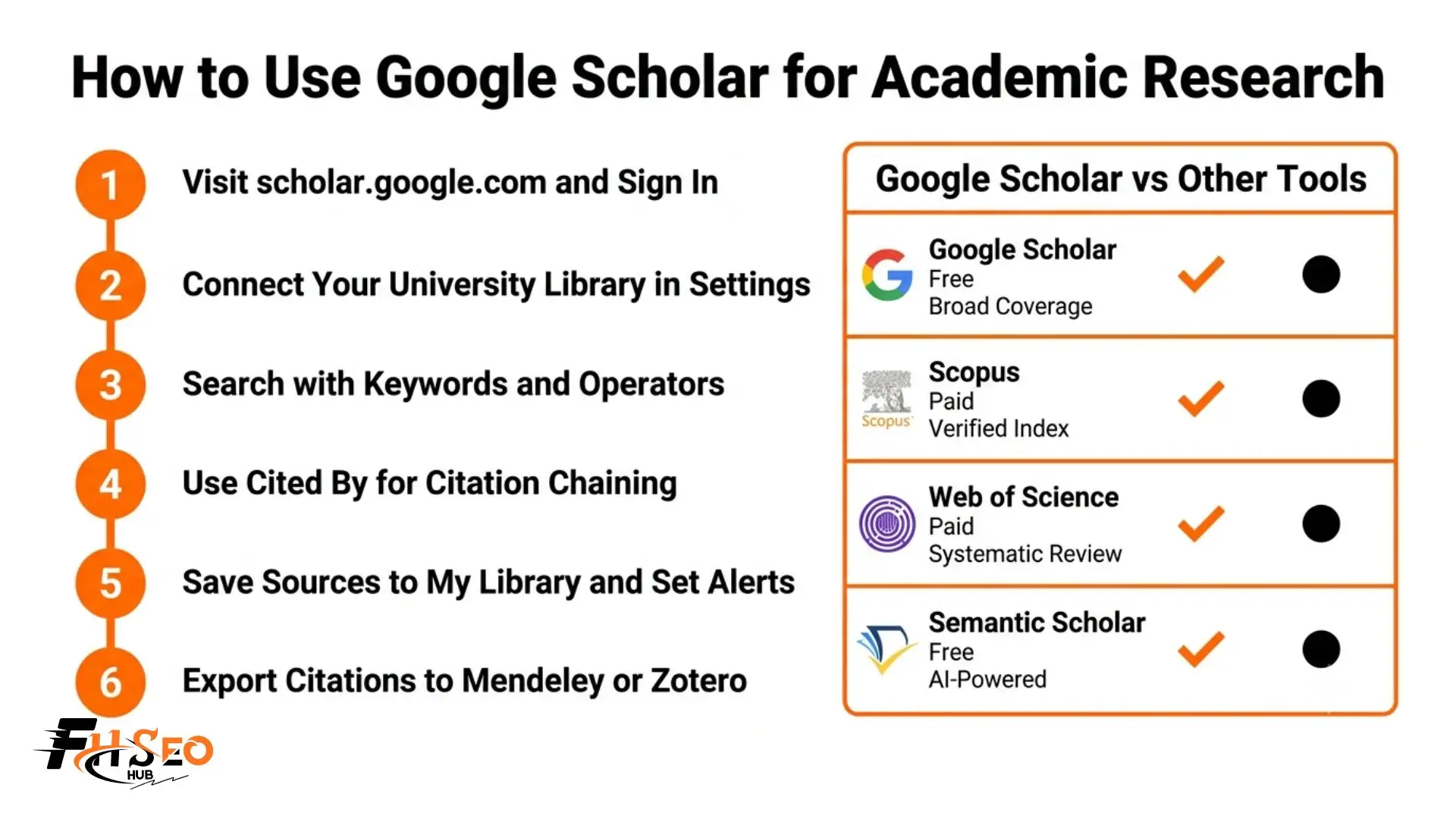
To use Google Scholar for academic research, go to scholar.google.com, sign in with your Google account, and connect your university library through Settings to unlock free full-text access. Search with specific keywords and operators like quotation marks, author:, and intitle:. Use the Cited by feature to trace how research developed, save sources to My Library, set up alerts for new papers, and export citations to Mendeley, Zotero, or EndNote.
Most students type a few words into the search bar, get 500,000 results, and grab the first thing that looks relevant. Others never realize paywalled full-text PDFs can be free through their institution. And some submit auto-generated citations with errors and lose marks. This guide fixes all three.
What Is Google Scholar and How Do You Use It for Academic Research?
Google Scholar is a free academic search engine at scholar.google.com that indexes scholarly articles, peer-reviewed journals, dissertations, theses, conference papers, working papers, books, and grey literature from universities, publishers, and research institutions worldwide. Unlike regular Google Search it filters out casual web content and surfaces only academic sources with citation tracking built into every result.
In 2026 it remains the most widely used starting point for academic research globally. One search surfaces journal articles alongside dissertations from university repositories, all in one place and completely free to search. The platform also indexes patents and case law, which most researchers never discover.
That said, Google Scholar is a discovery engine and not a quality filter. Peer-reviewed journals and predatory journals appear in the same results list with nothing to distinguish them. You find the papers. Evaluating them is your job.
Does Google Scholar Count as a Scholarly Source?
Google Scholar is not a scholarly source itself. It is an academic search engine that finds scholarly sources. The journal articles and dissertations it surfaces can be legitimate peer-reviewed work, but predatory journals and preprints appear in the same results without any label. Every source you find requires individual source credibility verification and peer review confirmation before you cite it in academic work.
How Do You Access Google Scholar and Connect Your University Library for Free Full-Text Access?
This is the step most students skip, and it costs them hours hunting for PDFs they could access instantly for free.
Here is the exact process:
- Go to scholar.google.com and sign in with your Google account
- Click the three-line menu (three horizontal lines) in the top-left corner
- Select Settings and then click Library Links
- Type your university or institution name into the search field
- Tick the checkbox beside your institution (you can select up to five libraries)
- Click Save
After this setup, every paywalled result in Google Scholar displays your institution’s access link directly beside it. Full-text PDF articles you would otherwise pay for become free through your existing library subscription.
Signing in with your Google account also unlocks My Library for saving and organizing sources, Google Scholar Alerts for automatic new research notifications, and citation export to reference managers like Mendeley, Zotero, and EndNote. None of these features work without being signed in.
How Do You Search Google Scholar Effectively Using Search Operators?
The search bar looks simple but it supports powerful search operators that separate effective researchers from people drowning in irrelevant results.
Here are the operators every student should know:
Start broad, then refine using operators. One change to your Boolean search can cut 50,000 irrelevant results down to 200 genuinely useful papers.
How Do You Use Advanced Search and Date Filters?
Access Google Scholar Advanced Search from the three-line menu. The form lets you combine journal restriction, author search, exact phrase search, and date range filtering in a single query. For dissertation or thesis work, a documented and repeatable search strategy built through Advanced Search is far more academically defensible than a standard keyword search. Use the left sidebar to sort results by relevance or publication date and to toggle patents and case law on or off depending on your research needs.
What Are Forward and Backward Citation Chaining and Why Do They Matter?
Most researchers use Google Scholar only as a keyword search engine. The citation chaining methodology turns it into something far more powerful.
Backward citation searching means opening any strong scholarly article and reading its reference list. Every paper it cites is a source you now have access to. Scan those references for relevant titles, search each one in Google Scholar, and you surface foundational seminal papers that would never appear in a keyword search alone.
Forward citation chaining uses the Cited by link below every Google Scholar result. Clicking it shows every later paper that referenced that source. Sort these citing papers by date to trace exactly how the research field developed after a seminal paper was published. If a 2014 study has 2,000 citations, the Cited by list contains the debates, replications, and developments built on its findings all the way through to 2026.
Used together as a deliberate research workflow, both techniques systematically map an entire field’s scholarly conversation over time. This is how experienced researchers build literature reviews that examiners describe as genuinely comprehensive rather than surface-level.
How Do You Save Sources and Set Up Google Scholar Alerts?
Click the star icon below any result to save it to My Library. Inside My Library create labelled folders organized by chapter, theme, or research question. For dissertation and thesis projects spanning months this prevents the panic of lost sources before submission.
For staying current without repeating manual searches use Google Scholar Alerts. Click the three-line menu and select Alerts. Enter your core search terms, author names, or journal titles and choose daily or weekly notifications. Google Scholar emails you new scholarly articles matching your saved terms as they get indexed, keeping your literature review current throughout your research workflow automatically.
How Do You Export Citations from Google Scholar to Mendeley, Zotero, or EndNote?
Click the quotation-mark icon below any Google Scholar result to open the citation export panel. It shows five ready-made formats: APA citation format, MLA citation format, Chicago citation format, Harvard citation format, and Vancouver citation format.
For reference managers like Mendeley, Zotero, EndNote, and RefWorks, click the BibTeX or RIS file link at the bottom to download a machine-readable file and import it directly into your manager.
Can You Trust Auto-Generated Citations from Google Scholar?
No. Treat every exported citation as a first draft that needs checking. Google Scholar auto-citations frequently contain errors including missing DOI numbers, incorrect author initials, dropped journal issue numbers, and incomplete details for dissertations, grey literature, and conference papers. Always verify every reference against your institution’s style guide before submission. For dissertation work these errors cost real marks and take longer to fix than if you check them as you go.
How Do You Identify and Avoid Predatory Journals in Google Scholar Results?
Google Scholar applies no quality filter. Predatory journals sit in exactly the same results list as legitimate peer-reviewed journals with nothing visually distinguishing them. This is the biggest academic integrity risk the platform creates.
To protect your research before citing any source:
A high citation count alone does not confirm legitimacy. Source credibility verification must happen at the journal level.
How Does Google Scholar Compare to Scopus, Web of Science, and Semantic Scholar?
Using Google Scholar for academic research is the right starting point for broad multidisciplinary discovery. It is free, covers more source types than any single database, and its Cited by citation tracking is genuinely powerful for literature mapping. But for formal systematic review work requiring a reproducible and documented search strategy, pair Google Scholar with Scopus or Web of Science. Both provide professionally indexed coverage and advanced bibliometric analysis tools that Google Scholar cannot match.
In 2026 two additional tools have entered many researchers’ workflows. Semantic Scholar uses AI to surface conceptual relationships between papers. Connected Papers generates a visual co-citation analysis map showing how papers in a topic cluster relate to each other. Neither replaces Google Scholar for broad discovery but both add a literature mapping dimension it cannot provide alone.
Final Thoughts
Using Google Scholar for academic research becomes genuinely effective the moment you move beyond the basic search bar. Connect your library links on day one. Use search operators and Advanced Search to control what you retrieve. Build your literature review through forward and backward citation chaining rather than keyword luck. Verify every source for peer review status and check every exported citation before it enters your bibliography. The researchers who get the most from this platform search with intention and document every step.
FAQs
Go to scholar.google.com, sign in, configure Library Links in Settings to unlock full-text PDF access through your institution, and search using specific keywords and Boolean operators. Save results to My Library, set up alerts for new research, and export citation references directly to Mendeley, Zotero, or EndNote.
No. Google Scholar is an academic search engine that finds scholarly sources. It surfaces peer-reviewed journals and dissertations alongside predatory journals and preprints with no label distinguishing them. Verify every result independently through peer review verification before citing it.
Visit scholar.google.com in any browser or use the Google Scholar App on mobile. Sign in with your Google account and configure Library Links in Settings to connect your university library for free full-text PDF access to paywalled articles.
Not automatically. Google Scholar indexes peer-reviewed journals alongside predatory journals and grey literature. Verify each source’s journal independently on Scopus, JSTOR, or the publisher’s website before trusting it in your academic work.
Not without checking them. Auto-generated APA, MLA, and Harvard citation formats from Google Scholar frequently contain errors including missing DOI numbers, wrong journal names, and incomplete author details. Always verify against your institution’s style guide before submitting.
It is a strong starting point for literature review discovery and citation chaining research. For a formal systematic review chapter with a defensible search strategy, pair Google Scholar with Scopus or Web of Science which provide verified index coverage that Google Scholar cannot confirm.
Set up Google Scholar Alerts by clicking the three-line menu and selecting Alerts. Enter your keyword search terms or author names and choose daily or weekly emails. Google Scholar notifies you automatically whenever new scholarly articles matching those terms get indexed.
Use Google Scholar for broad multidisciplinary discovery and forward citation chaining. Use PubMed for clinical and life sciences research requiring rigorous peer review standards. Use Scopus or Web of Science when your dissertation requires a documented and reproducible search strategy.


