What are Sponsored Links and How to Use Them

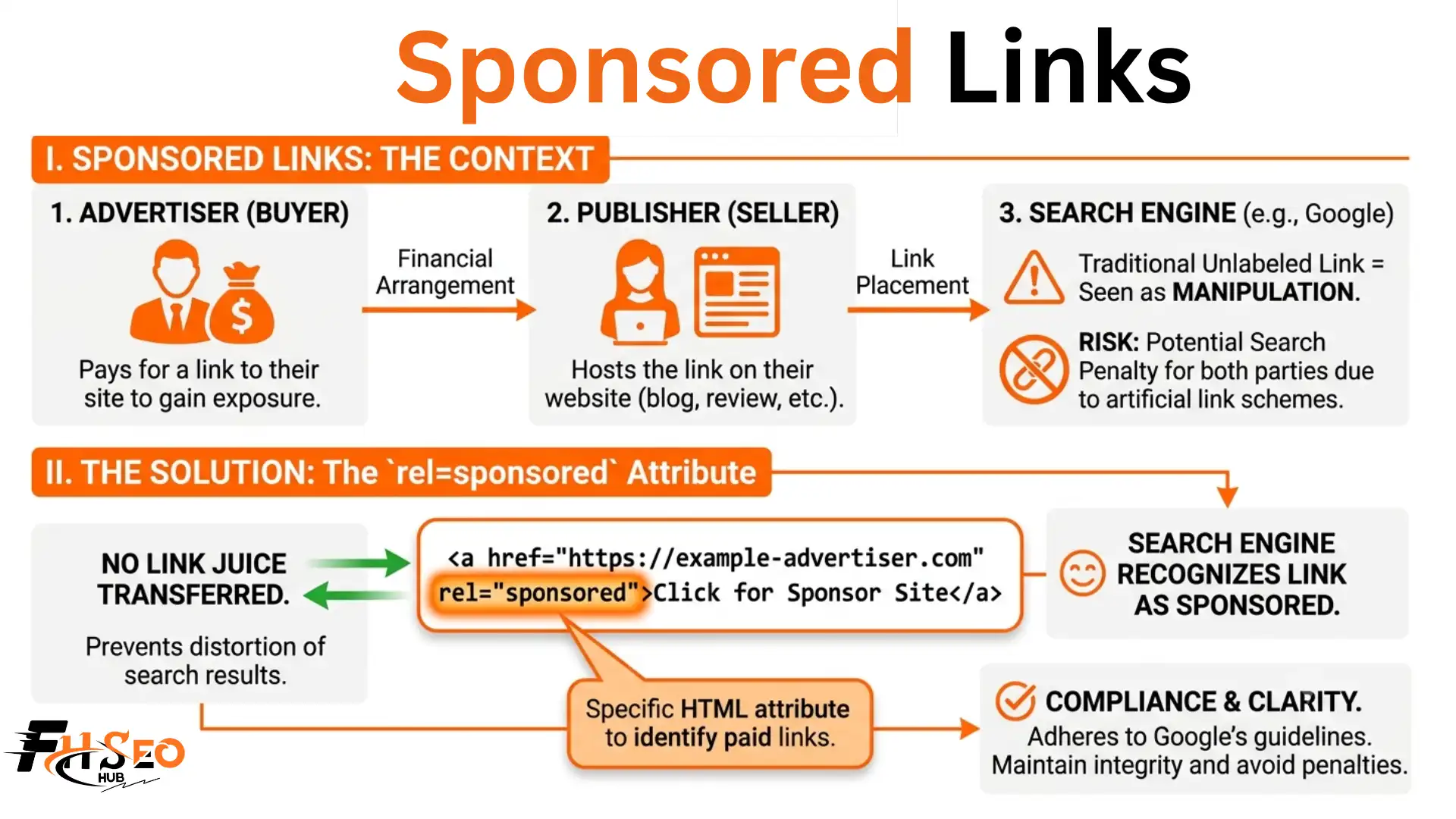
A sponsored link is a paid placement, either a Google Ads listing or a backlink tagged with rel=”sponsored”, that businesses pay for to gain visibility rather than earn naturally. It will not boost your rankings directly, and using one incorrectly can trigger real penalties. Here is what actually happens once money changes hands for a link in 2026.
What Is a Sponsored Link?
It is a hyperlink that exists because a business paid for it, either as a Google Ads listing marked Sponsored in search results, or as a backlink placed inside content and tagged with rel=”sponsored”. Both share the same name, but they work in completely different ways and solve different marketing goals.
A PPC ad on Google’s results page counts as one. So does a paid guest post with an outbound link back to your site. The label is identical. The mechanics behind each are not.
| Type | Where It Appears | Who Controls It |
| Paid search ad | Google search results page | Google Ads auction |
| Paid backlink | Inside another site’s content | Publisher and advertiser |
The first type disappears the moment you stop paying. The second can stay live for years, depending on the agreement.
What Is the rel=”sponsored” Attribute?

Rel=”sponsored” is the HTML attribute Google introduced to mark any link that exists because of payment, covering advertorials, affiliate links, and paid guest posts. It tells crawlers the link is commercial, so it should not count as an organic endorsement of the destination page.
In 2005, Google created nofollow specifically to fight comment spam. By 2019, nofollow had absorbed too many unrelated uses, so Google split it into three separate signals: nofollow, sponsored, and ugc, each pointing to a different reason a link should not pass authority.
| Attribute | Meaning | Passes Authority |
| Dofollow | Full editorial endorsement | Yes |
| Nofollow | No endorsement given | No, treated as a hint |
| UGC attribute | Content added by a visitor | No, treated as a hint |
| Sponsored attribute | Link involves payment | No, treated as a hint |
Nofollow, the UGC attribute, and the sponsored attribute all behave as hints rather than hard rules now, which means Google can still crawl them and occasionally weigh them, just not as a ranking vote.
Do These Links Pass PageRank?
No. A properly tagged sponsored link is built specifically to withhold PageRank and link equity from the destination page, so it will not raise your rankings directly. That does not make it bad for SEO. It only becomes a problem when the payment is hidden instead of disclosed.
Google’s guidelines specifically warn against buying links that pass ranking power without disclosure. That counts as a link scheme, and it gets treated as manipulation regardless of intent.
Will I Get Penalized for Using Them?
Rarely, if you tag correctly. Google built the sponsored attribute so paid links would not trigger a penalty on their own. The real exposure sits in two separate places: a manual action from Google for undisclosed paid links, and a completely different legal risk under FTC advertising rules that has nothing to do with your HTML code.
SEO professionals consistently overlook this second risk. The FTC requires a material connection, meaning any payment or free product, to be disclosed clearly and conspicuously to readers. This applies whether or not the link carries rel=”sponsored”, and it sits completely separate from Google’s rules. Skipping disclosure can lead to penalties that run into the tens of thousands of dollars per violation, a risk most SEO advice never even mentions. A common mistake beginners make is assuming the HTML attribute alone covers them legally. It does not. The attribute talks to search engines. Disclosure talks to readers, and both need to happen.
How Much Do Sponsored Links Cost?
Pricing varies widely, but most agencies and publishers fall into recognizable tiers based on domain authority and audience size. Niche blogs typically charge $100 to $300 for a single link placement. Mid sized industry sites usually land between $500 and $1,500. Large media outlets often charge $2,000 to $5,000 or more.
A fully custom sponsored feature on a major publication can push past $10,000. If you run paid search instead of a backlink placement, Google Ads on the search network typically averages $1 to $2 per click, though competitive industries like law and insurance often pay more, and your position also depends on Quality Score, not just your bid.
| Publisher Type | Typical Price Range |
| Niche blog | $100 to $300 |
| Mid sized industry site | $500 to $1,500 |
| Large media outlet | $2,000 to $5,000+ |
| Premium custom feature | $10,000 and up |
These numbers vary by niche and negotiation, so treat them as a starting reference, not a fixed price list.
What Factors Affect Their Pricing?
Three factors drive the price. Domain authority and trust score matter most, since a site with a strong backlink profile can charge more. Audience size and engagement come next. Placement format matters too, since a simple link insertion costs far less than a fully written sponsored post.
Doing this yourself saves the markup an agency charges, but it costs real time on outreach, vetting, and negotiation. Most agencies charge a management fee on top of the placement cost itself, which typically makes sense once you are buying more than a handful of placements a month and need consistent quality control.
What Are the Different Types of Sponsored Links?
There are four common types. Paid search ads run through platforms like Google Ads and charge per click. Sponsored content, often called native advertising, is a full article a brand pays a publisher to create. Affiliate links earn a commission per sale. Influencer placements trade payment or free product for a mention.
Most link building agencies treat sponsored content as the most reliable of the four, since it combines a lasting placement with a clear content strategy, while paid search ads work best for short term campaigns tied to a launch or promotion.
How Do I Find and Vet These Links?
Ahrefs Site Explorer is generally the strongest option for filtering a domain’s backlinks by attribute type, since its sponsored filter surfaces paid links quickly. Semrush’s Backlinks tool does something similar and pairs well with its Site Audit feature. Neither tool confirms if the traffic behind a placement is real, which is where SimilarWeb usually helps.
A common mistake beginners make is trusting a pitch with zero research behind it. Watch for a seller who has clearly never read your site, pressure to pay before any real conversation, requests for cryptocurrency or prepaid cards, and generic, poorly written outreach. None of these alone confirms a scam, but stacked together they are a strong signal to walk away. Steer clear of link farms and private blog networks entirely, since Google can detect these patterns fairly easily.
Before paying anyone, check the site’s actual traffic trend rather than trusting screenshots the seller sends you. A site with flat or declining traffic over the past year is a weak buy no matter how impressive its domain authority looks on paper.
How Do I Add the Sponsored Attribute in WordPress?

Use a plugin like Yoast SEO or Rankmath to add the tag without touching code. Insert your link the normal way, then toggle the sponsored option in the link settings panel before you publish. Both plugins also let you combine sponsored with nofollow on the same link, which some sites still do out of caution even though the sponsored tag alone already satisfies Google’s requirement.
Do They Still Help SEO Indirectly?
Yes, indirectly. A well placed sponsored link drives referral traffic, and repeated brand exposure often grows branded search volume over time. In typical campaigns, referral traffic shows up within days, but branded search growth and any resulting organic links usually take several weeks to a few months, and results vary a lot by publisher audience size.
AI search tools increasingly weigh brand mentions and citation frequency alongside trust signals like E-E-A-T, so a placement on a trusted site can support AI visibility even though it carries no PageRank at all. This is a fairly recent shift, and most SEO advice on this topic still frames the whole tactic around 2019 style ranking rules without accounting for it.
How Are They Different From Organic Links?
Organic links are earned because a site owner genuinely values your content, and they pass full link equity. Paid placements exist because of payment, and they pass no ranking authority at all under Google’s current guidelines.
| Organic Link | Paid Placement | |
| Cost | Free, earned | Paid |
| Passes authority | Yes | No |
| Longevity | Often permanent | Depends on the agreement |
Final Thoughts
A sponsored link will never move your rankings on its own, and that was never really the point. Tag every paid placement correctly, budget for real audience quality instead of raw traffic numbers, and treat disclosure as a legal requirement, not just an SEO best practice. Handled this way, these placements remain one of the more reliable tools for building visibility in 2026, even without passing a single point of PageRank.
FAQs
There is no real difference. Paid link is the general term for any link acquired through payment. Sponsored is the specific Google attribute applied to mark those paid links correctly.
Yes, technically. Google still counts them as links pointing to your site, but they carry no ranking weight, so they will not show up as authority in most backlink tools the way a dofollow link does.
Yes. Any listing marked Sponsored or Ad on a search results page falls under the same umbrella term, even though buying through Google Ads works completely differently from paying a publisher for a backlink.
Either works for SEO purposes, since both block ranking authority, but Google has indicated a preference for the sponsored tag on affiliate links specifically, since it states the commercial reason more precisely.
A regular guest post is contributed for free in exchange for exposure or a relevant, earned link. A sponsored post involves payment, and any outbound link inside it needs the sponsored attribute.
No. Nofollow alone still satisfies Google’s requirement to mark a paid link, as long as the payment itself is disclosed somewhere. Sponsored is simply more specific about why the link exists.


