
How to Forecast Organic Traffic Step-by-Step (Free Google Sheets Template)

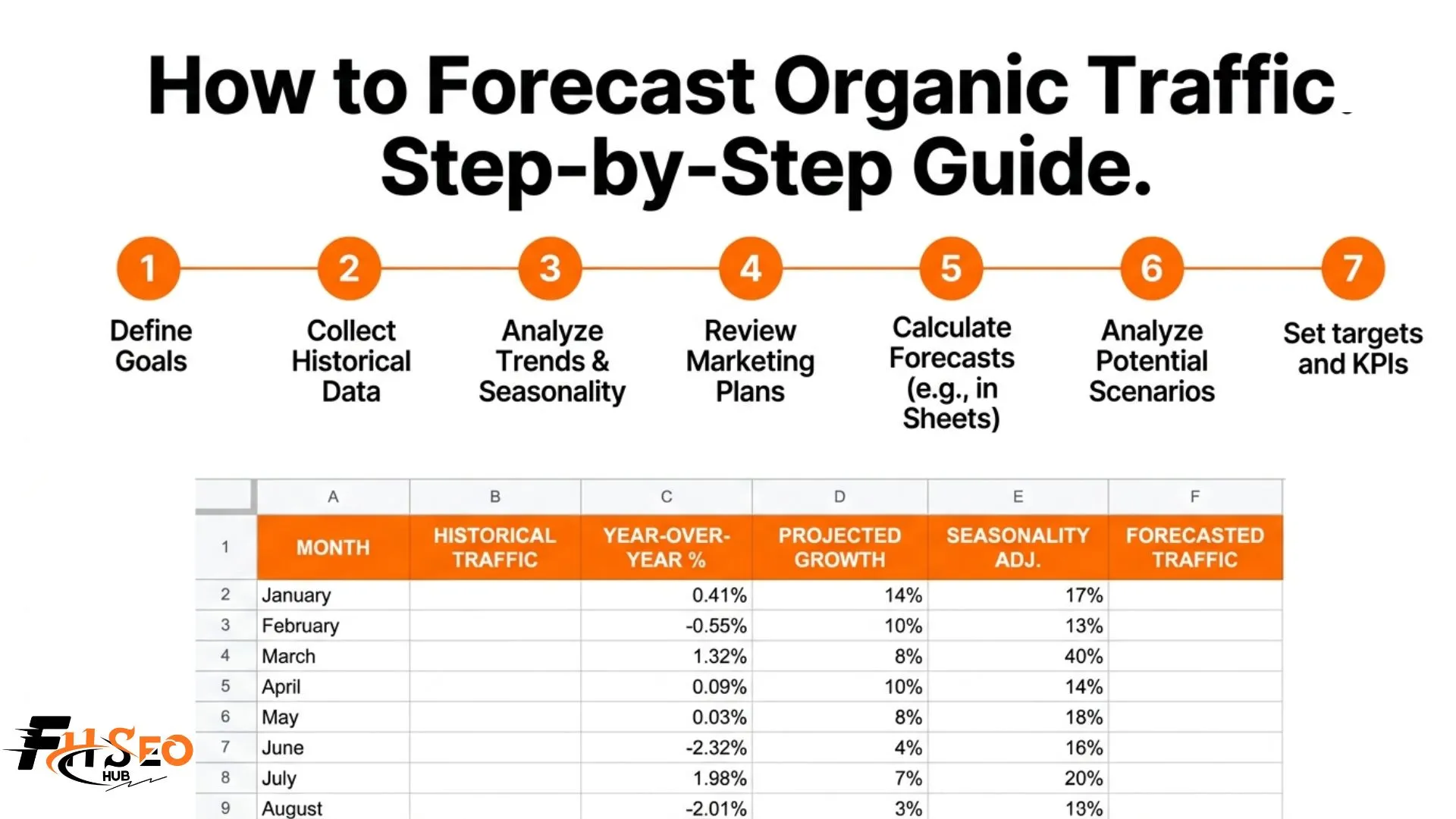
To forecast organic traffic, pull 12 to 18 months of data from Google Search Console, set your organic traffic baseline, map your keyword rankings to current CTR benchmarks, apply a seasonality multiplier from Google Trends, then build your projection in a Google Sheets model. This guide walks through all 7 steps with a free template you can copy and use today.
This guide covers the complete 7-step method: from pulling your first data export all the way to building a three-scenario Google Sheets forecast model. Follow the steps in order. Each one feeds directly into the next.
The 7-Step Method for How to Forecast Organic Traffic
01: Get Your Data from Google Search Console
Download your clicks, impressions, CTR and average position for every search query and page. Pull the last 16 months so you have enough data to spot trends.
02: Remove Your Brand Name Searches
Filter out any searches that include your brand name. This keeps your numbers honest and shows only traffic that came from pure SEO effort.
03: Find Your Monthly Traffic Baseline
Calculate how much non-brand organic traffic you get on average each month. Also check whether that number is growing or shrinking compared to last year.
04: Match Keywords to Click Rate Benchmarks
Each keyword ranking at a certain position gets a realistic click-through rate applied to it. Use current 2026 benchmark data so your estimates reflect how people actually search today.
05: Adjust for Seasonal Demand Using Google Trends
Some months naturally get more searches than others. Use Google Trends to find those patterns and adjust your monthly projections up or down accordingly.
06: Build a Simple Forecast Spreadsheet in Google Sheets
Put all your numbers into one spreadsheet. Group keywords into clusters and let the sheet calculate your traffic projections automatically.
07: Show Three Scenarios Instead of One
Never present a single forecast number. Build a best case, average case and worst case range so your projections stay honest and useful no matter what happens.
Step 1: Pull Your Data from Google Search Console
Google Search Console is where every reliable organic traffic forecast starts.
Here is exactly what to export:
Download both query-level and page-level exports. Query data shows which keywords drive traffic. Page data shows which landing pages receive it. You need both views to build a forecast that holds up.
Step 2: Clean Your Data and Remove Brand Traffic
Raw GSC data mixes branded searches (people already looking for your brand) with organic SEO-driven traffic. Keeping both together overstates your true SEO performance.
Filter out:
What remains is your non-brand organic traffic. This is the number that genuinely reflects SEO performance and the one that belongs in your forecast model. Year-over-year growth in non-brand traffic is also the most credible metric you can show a client or leadership team, because it removes the noise of brand marketing from your SEO results.
Step 3: Set Your Organic Traffic Baseline
Your baseline answers a specific question: if you do nothing new, where is your traffic already heading?
To calculate it:
Example: your site averaged 7,500 monthly organic visits over the last 3 months. Your YoY growth rate is 15 percent. Your baseline projection for next year, with no additional SEO work, is roughly 8,600 monthly visits. That is your floor. Everything above it reflects the expected impact of planned SEO activity.
This baseline also protects you from overpromising. When you present projected growth to a client, showing the baseline growth they would get from doing nothing versus the uplift from your work is far more credible than one combined number.
Step 4: Map Keyword Rankings to CTR Benchmarks
Now take your target keywords and assign a realistic CTR for the ranking position you expect to reach. This is where the monthly traffic forecast gets specific.
The formula is: Estimated Traffic = Monthly Search Volume x Expected CTR at Target Position
CTR benchmarks to use based on aggregated data from Advanced Web Ranking and Backlinko:
One rule that prevents the most common forecasting mistake: always work at the keyword cluster level, not one keyword at a time. If three related searches would rank the same page, combine their volumes into one cluster projection before applying CTR. Counting them individually inflates your model and produces numbers that look embarrassing once real data arrives.
Tools like Ahrefs and Semrush show Traffic Potential per page, which already groups multiple keyword variants together. Use that metric as a cross-check against your manual calculation.
Step 5: Apply Seasonality Multipliers Using Google Trends
Search demand is not flat across 12 months. A keyword driving 5,000 monthly searches in January might pull 13,000 in October. Ignoring this is one of the fastest ways to produce a forecast that looks immediately wrong to anyone who knows the niche.
How to build your seasonality multiplier:
Example: your keyword scores 35 in February and 88 in November. Your November projection should be 2.5x your February projection (88 divided by 35 equals 2.51).
This single adjustment is what separates an SEO forecast spreadsheet that looks professional from one that anyone with industry experience can immediately spot as unreliable. Data normalization using Google Trends data is a standard practice that most beginner forecasts skip entirely.
Step 6: Build Your Forecast in Google Sheets
Now bring every input together into one Google Sheets model. Here is the column structure that keeps it clean and easy to update:
Use the FORECAST function in Google Sheets for trend-based projections. Lock your formula columns to prevent collaborators from accidentally overwriting calculations. Keep a separate input tab so anyone updating the model only touches the raw numbers, not the logic.
Step 7: Create Best, Average, and Worst Case Scenarios
Never present one number. Present three.
A single projected figure forces everyone to treat it as a guarantee. Three scenarios tell a more honest story and protect your credibility when real results vary from your projection.
Conservative scenario: Lower CTR assumptions, as if rankings land one to two spots below target. Apply a 0.75x to 0.85x multiplier to your expected traffic.
Expected scenario: Your baseline CTR assumptions with planned SEO activity fully executed on schedule.
Aggressive scenario: Top-end CTR with strong content output, active link acquisition and favorable algorithm movements.
Label all three clearly in your Google Sheets model. When you compare forecast vs actual traffic every month, you will quickly see which scenario the site is tracking toward. That review cycle is what makes the model genuinely useful beyond the initial presentation.
Your Starting Point
Knowing how to forecast organic traffic accurately takes one completed model and two months of comparing projections against real results. The first version will not be perfect. The second will be noticeably better. Start with Google Search Console, follow the 7 steps above and build your three-scenario model in Google Sheets today. The template structure takes one afternoon to set up and produces results you can present in your next client meeting with confidence.


