
What is Heatmap Local SEO: How to Set It Up and What to Do with Red Zones

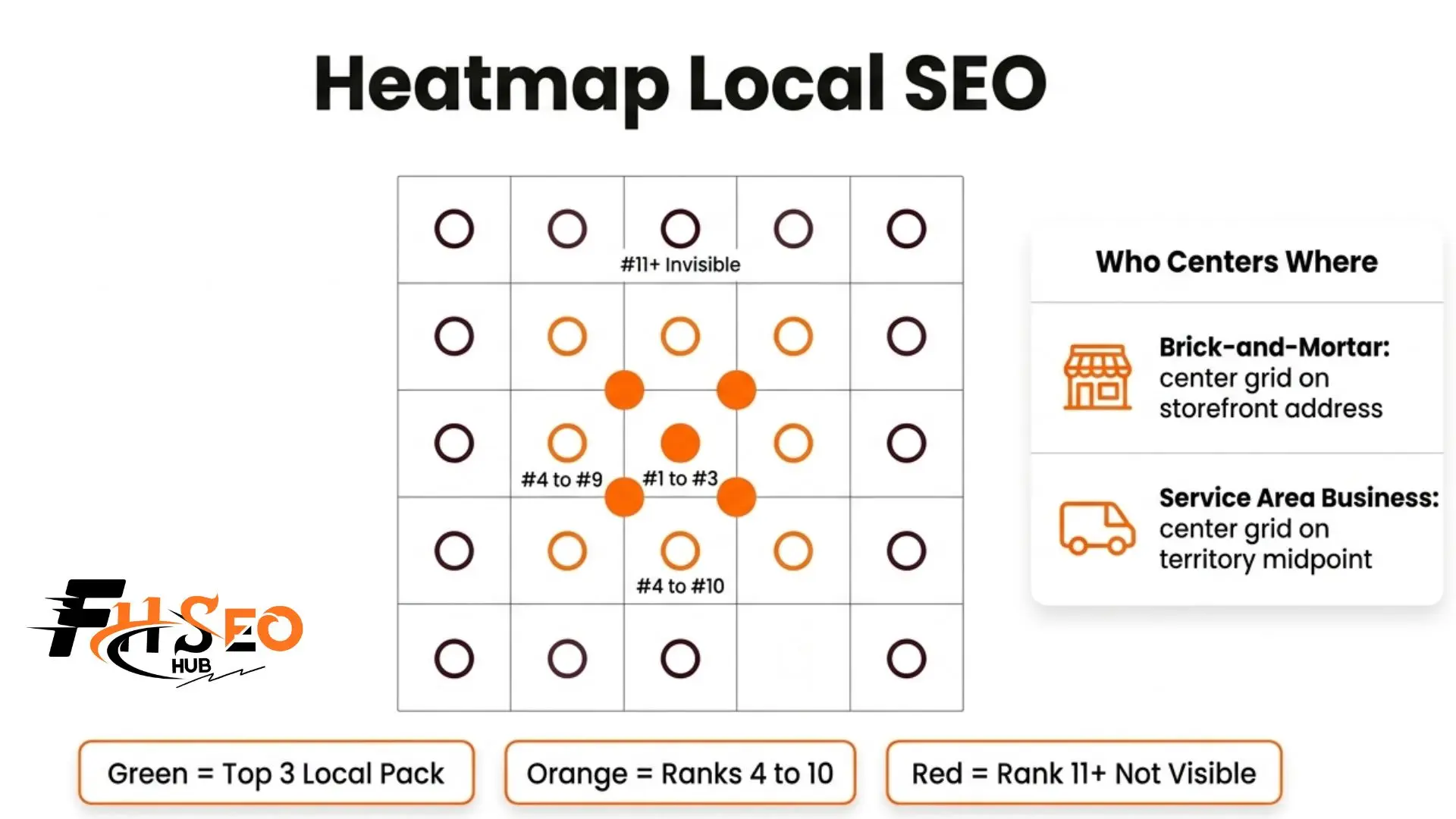
A local SEO heatmap shows your Google Business Profile ranking position across a color-coded geographic grid, revealing exactly where your business appears in local search results and where it disappears entirely. The painful reality most rank trackers hide is that you can rank number one right outside your front door and fall completely off the map three blocks away.
What Is a Local SEO Heatmap?
A local SEO heatmap is a geographic ranking visualization tool. It places a grid over your local area and checks your Google Business Profile rank position at multiple physical locations simultaneously, rather than giving you one blended average number like most rank trackers do.
The result is a color-coded map of your local search visibility. Instead of guessing, you see exactly where your business appears in the local pack and where competitors are capturing traffic instead.
How Does a Geo-Grid Work and What Is the 5×5 Grid?
A local SEO geo-grid works by dividing your target area into evenly spaced latitude and longitude coordinates. At each grid point, the tool simulates a real local search for your chosen keyword and records your map pack rank at that physical location.
The 5×5 grid means your area gets divided into 25 individual grid points, each representing a distinct real-world location. That gives you 25 simultaneous local rank readings instead of one blended number, and each point gets color-coded.
Why Do Rankings Drop as Distance Increases from Your Business?
The answer is proximity-based search. Google uses proximity to the searcher as a confirmed local ranking factor. The closer someone physically is to your address, the stronger your built-in proximity advantage. As distance grows, that advantage fades and nearby competitor signals start to outweigh it.
This distance-driven rank drop is called the proximity decay rate. It explains why every heatmap fades from green near your address to orange and eventually red zones farther out. This is not always a failure of your SEO strategy. It is how local search works.
The important distinction is between normal proximity decay and a competitor outperforming you in a specific direction. One means you have hit geographic limits. The other means a targeted fix exists and that difference only shows up clearly on a heatmap.
Service Area Business vs Brick-and-Mortar: Two Completely Different Setups
Brick-and-mortar businesses should center their geo-grid on the physical storefront address because customers travel to them. The heatmap radiates outward from that fixed point.
Service area businesses (SABs) like plumbers, HVAC contractors, and roofers travel to customers. An SAB centering its grid on the office shows strong green zones near the building and massive red zones across the territory it actually serves, producing misleading data.
SABs should center the grid on the middle of their service territory, not their office address. That single change produces an accurate picture of where the business ranks across its real working area and makes the optimization priorities much clearer.
How to Set Up a Local SEO Heatmap Step by Step
The setup process follows five steps.
Tools widely used for this include Local Falcon, BrightLocal, EmbedSocial, GeoRanker, and GMB Everywhere for quick browser-based spot checks at no cost.
Most businesses with multiple services need separate geo-grid reports for each primary service. A plumbing company tracking only “plumber near me” misses the entire ranking picture for drain cleaning or water heater installation, each of which carries its own geographic ranking profile.
How to Diagnose a Red Zone and Know Which GBP Attribute to Fix
The pattern of your red zones reveals the likely cause, and each pattern calls for a different response.
Red zones clustered right around your business address almost always point to GBP attribute gaps. This typically means the wrong primary GBP category, missing services, or a lack of recent GBP photos and posts. Fix your primary category first, fill in all missing services, and add fresh high-quality photos before anything else.
Red zones spreading outward evenly in all directions represent normal proximity decay. The response here is increasing review volume and review recency, building local backlinks from area businesses and directories, and publishing GBP posts that mention specific nearby neighborhoods to reinforce local relevance.
Red zones appearing only in one direction mean a competitor physically located in that zone sits closer to searchers there. The fix is location-specific landing pages or geo-targeted content built around the landmarks, neighborhoods, or zip codes in that weaker zone.
Red zones scattered randomly across the entire grid with no discernible pattern almost always signal NAP inconsistency across local citations. Run a full NAP audit using a tool like Whitespark or Moz Local before spending time on any other fix.
How to Use Sequential Heatmaps to Prove ROI and Retain Clients
Save your initial heatmap report as a baseline before any optimization work begins. Record the date, keyword, and grid settings so every future scan matches exactly.
After 60 to 90 days of GBP optimization, citation building, and review generation, run the same geo-grid with the same settings. Place the two maps side by side. The shift from red zones to green zones across specific neighborhoods is the clearest visual proof of campaign progress available in local SEO.
It requires no SEO knowledge to understand, which makes it the most effective communication tool for client retention. Results like a 30% increase in leads for a remodeling firm and a 25% increase in local inquiries for an HVAC contractor have both come from this type of targeted, heatmap-guided work.
How Do You Combine User Behavior Heatmaps With Geo-Grid Data?
Geo-grid rank heatmaps show where your business appears in local search. User behavior heatmaps covering click heatmaps, scroll heatmaps, and movement heatmaps on your actual website show what happens after someone from that area visits your site.
Combining both gives you the complete diagnostic chain. If a green zone is not producing calls, user behavior data often explains why: a form buried below the scroll threshold, a weak CTA, or NAP information hard to find on mobile can all kill conversions from visitors who found you in the local pack but left without contacting you.
Connect UTM links from GBP posts to Google Analytics 4 to tie geo-grid rank data to actual business outcomes rather than rank positions in isolation.
How Often Should You Run a Local SEO Heatmap?
Match your scan frequency to your campaign phase and competitive environment.
Most platforms like EmbedSocial auto-generate a fresh local rank heatmap every 14 days as a standard baseline. Treat that as the floor, not the ceiling, when actively running campaigns.
What Do Green Zones Mean in 2026 With AI Overviews?
A green zone still confirms strong Google Business Profile authority at that geographic location, but it no longer guarantees the same click volume it produced two years ago. In 2026, Google AI Overviews and AI-generated local summaries appear above the local map pack for many queries, absorbing clicks before users ever reach the business listings below.
Pairing your geo-grid data with GBP click-through rate from Google My Business Insights is now essential. A green zone with declining GBP clicks usually points to an AI Overview sitting above the map pack, not a strategy failure. Addressing that requires citation-ready content that earns your brand a citation inside AI-generated summaries.
Run Your First Heatmap This Week
Run your first heatmap local SEO report using a free scan on Local Falcon or GMB Everywhere. Use your storefront address as the grid center if you are a brick-and-mortar business, or the center of your service territory if you operate as a service area business. Save that first report as your baseline before making any changes. That baseline turns every future optimization into provable, visual progress that clients and stakeholders can see and understand.


