WordPress Permalink Structure: The Best URL Setup for SEO

A permalink is the permanent URL pointing to a specific post, page, or piece of content on your WordPress site, and getting the structure right matters more than most site owners realize until they change it wrong. The wrong permalink structure quietly creates duplicate content issues, broken links after a migration, and confusing site architecture that both users and search engines struggle to parse.
What Is a Permalink?
A permalink combines your domain with a slug, the readable part of the URL after the domain, and it’s meant to stay stable even as the content itself gets updated over time. WordPress generates this automatically from your post title by default, though every major SEO plugin lets you edit it manually before or after publishing, and most experienced site owners do exactly that for anything longer than a short, natural phrase.
The word itself comes from “permanent link,” and that permanence is the entire point. Once a URL gets indexed, shared, and linked to from other sites, changing it without a proper redirect breaks every one of those connections at once, sometimes without any warning until traffic or referral data quietly starts dropping.
How Do Permalinks Affect SEO?
Permalinks don’t directly boost rankings on their own, Google has said as much publicly, but a clean, descriptive URL improves crawlability and click-through rate, and it helps both users and search engines understand a page’s topic before anyone even opens it. A URL like /best-running-shoes/ tells a searcher exactly what to expect in the snippet preview, while /?p=4471 tells them nothing.
This indirect effect compounds. Better click-through rate from a descriptive URL feeds engagement signals, and easier crawlability means search engines index and re-crawl your content more efficiently, particularly across large sites with thousands of pages where crawl budget genuinely becomes a limiting factor.
A descriptive slug also shows up in shared links across social media and messaging apps, where the raw URL itself is often visible before anyone clicks. A URL that clearly states its topic earns more trust and more clicks in that context than a cryptic string of numbers ever will.
Why Your Permalink Structure Matters More Than It Looks
A messy or inconsistent permalink structure creates real problems beyond aesthetics. Duplicate content risk shows up when the same page is reachable through multiple URL variations. Broken links pile up after a site migration or structure change without redirects. Confusing site architecture makes it harder for both crawlers and visitors to understand how your content connects to everything else on the site.
A common mistake beginners make is treating permalink structure as a cosmetic decision made once at launch and never revisited, when it needs to hold up against years of accumulated link equity, backlinks, and internal links pointing at those exact URLs long after the initial setup is forgotten.
Types of WordPress Permalink Structures
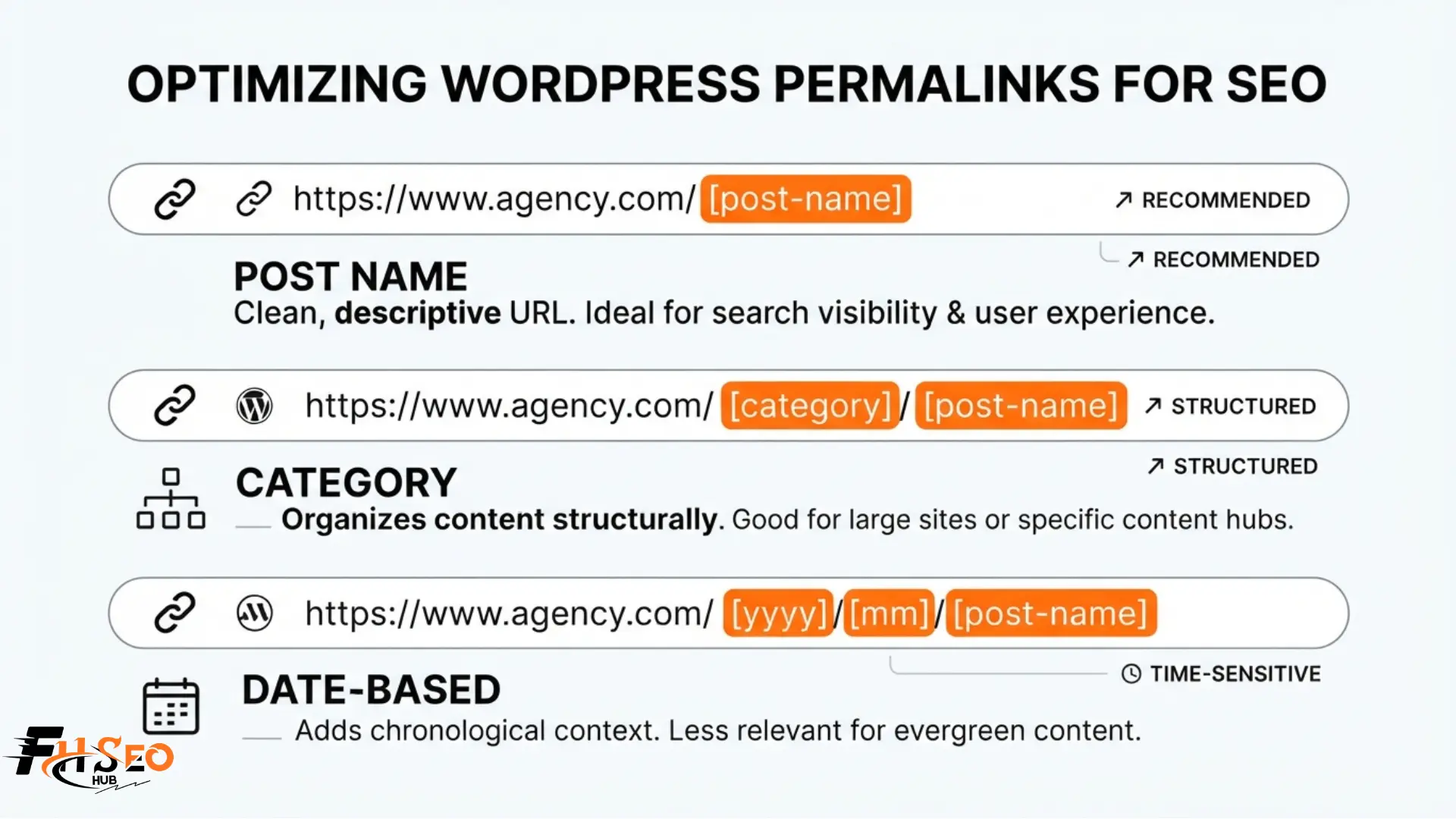
WordPress ships with six built-in permalink options, plus the ability to build your own custom structure from individual tags.
Plain Permalink
The default structure uses a query string like ?p=123, carrying no keyword value and no readability at all. This is the weakest option for both SEO and user experience, and no current guidance recommends keeping it past initial setup.
Example: yoursite.com/?p=123
Numeric Permalink
Numeric structures use sequential post IDs instead of readable text. They resolve quickly on the server since there’s no lookup required, but they give search engines and users zero contextual information about what the content genuinely covers.
Example: yoursite.com/archives/452
Day and Name Permalink
This structure embeds the full publish date before the post name, making it a classic date-based URL. It can make genuinely evergreen content look outdated at a glance, and it wastes URL characters that could otherwise carry relevant keywords instead of a timestamp nobody searches for.
Example: yoursite.com/2026/03/15/how-to-bake-sourdough-bread/
Month and Name Permalink
Functionally similar to Day and Name but drops the day itself. It carries the same date-staleness risk, though WordPress’s own documentation notes it resolves somewhat faster on the server than structures built around category, tag, author, or post name tags.
Example: yoursite.com/2026/03/how-to-bake-sourdough-bread/
Post Name Permalink
This structure uses only the descriptive slug after the domain, producing clean, keyword-rich URLs that read naturally and stay relevant regardless of when the content was originally published. This is the structure most current SEO guidance converges on for a reason.
Example: yoursite.com/how-to-bake-sourdough-bread/
Custom Structure
Custom Structure lets you combine permalink tags freely, including adding a category base ahead of the post name. Every segment you add increases both the server resources required to resolve the URL and how rigid the structure becomes if your site’s organization changes later.
Example: yoursite.com/recipes/how-to-bake-sourdough-bread/
The Ideal WordPress SEO URL Structure
Post Name is the structure most current SEO guidance and plugin developers converge on, since it produces the shortest, most descriptive URL while avoiding the server resource cost WordPress’s own documentation attributes to permalink structures beginning with category, tag, author, or postname tags. A flat URL structure like this also scales more predictably than a deep URL hierarchy, since you’re never locked into a category assignment that might change as your site grows.
For most blogs and content sites, /%postname%/ alone is the safest default. Larger sites organizing dozens of distinct content verticals sometimes add a single category level for site architecture clarity, but this trades some long-term flexibility for that added context, a trade-off worth making deliberately rather than by default.
Should I Put the Category in My URL?
Category-based URLs can reinforce topical silos and site architecture for large, multi-topic sites, giving both users and search engines an immediate sense of which section of the site a page belongs to. The trade-off is real: every time you reorganize or rename a category, you create a redirect chain for every URL under it, and the structure becomes ambiguous the moment a single post carries more than one category, since WordPress defaults to using only the first one assigned.
For most sites, especially smaller ones or those whose content focus might shift over time, a plain Post Name structure avoids this problem entirely. Reserve category-based URLs for sites with a genuinely stable, unlikely-to-change content taxonomy and a clear reason to reinforce that hierarchy for search engines.
A useful middle ground some larger sites adopt is keeping category information visible in navigation, breadcrumbs, and internal linking, without baking it directly into the URL itself. This preserves much of the site architecture benefit while avoiding the redirect burden that comes with ever renaming or merging a category down the line.
Should I Remove Stop Words From My URL Slug?
Not automatically. Stop words are common connector words like “a,” “the,” and “and” that carry grammatical function but little unique meaning. Yoast SEO removed its automatic stop-word stripping feature, known as clean slugs, back in version 7.0, so if you’re relying on that plugin to handle this for you, it no longer does. Google has also stated publicly that stop words in URLs aren’t something to obsess over, favoring natural, readable phrasing over aggressively stripped-down slugs.
A common mistake beginners make is manually deleting every stop word from a slug in the name of SEO, ending up with an unnatural, hard-to-read string of keywords instead of a phrase a human would naturally type or share. Trim a slug for length and clarity when it’s genuinely too long, not as a mechanical rule applied to every post regardless of readability.
Hyphens vs. Underscores in URLs
| Separator | How Search Engines Read It | Recommendation |
| Hyphen (-) | Treats words on either side as separate | Use this |
| Underscore (_) | Treats words on either side as joined together | Avoid |
Hyphens separate words the way search engines expect, which is why “best-running-shoes” reads as three distinct terms while “best_running_shoes” risks being interpreted as a single joined string. This has been the standard recommendation for years and remains unchanged heading into 2026. WordPress itself defaults to hyphens when auto-generating a slug from your post title, so this is one setting most sites never need to touch manually unless an older theme or import process introduced underscores somewhere along the way.
Top SEO URL Best Practices for Better Rankings
How Do I Change This Safely?
Changing permalinks on an established site carries real risk to your existing link equity and rankings if done carelessly. Follow this sequence rather than skipping steps:
- Back up your site’s files and database completely before touching anything
- Map out your old URLs and plan 301 redirects for every one before you switch structures
- Update the structure under WordPress Permalink Settings and save
- Set up the redirects immediately, using a Redirection Plugin or your SEO plugin’s built-in redirect manager
- Test a sample of old URLs manually to confirm they redirect correctly rather than returning a 404 error
- Monitor Google Search Console closely for several weeks, watching for a spike in crawl errors or a drop in indexed pages
Search engines typically need several weeks to fully re-crawl and re-index a restructured site, and rankings can dip temporarily even with clean redirects in place, so treat this as a project with a real recovery window, not an instant swap. A brand-new site with no accumulated backlinks or indexed history carries far less risk here than an established one with years of external links pointing at the old structure.
For a site with a genuinely large number of URLs, a bulk redirect approach through your SEO plugin or a dedicated redirection tool saves significant time over mapping each URL by hand, though it still deserves a manual spot check afterward rather than blind trust in an automated match. Pay particular attention to your most trafficked and most linked pages first, since those carry the most link equity at stake if a redirect gets mismatched.
Permalinks for WooCommerce Stores
WooCommerce manages product, product category, and shop base permalinks separately from your standard post and page permalinks. Changing your blog’s URL setup under Settings will not automatically change your product URLs, you need to configure the WooCommerce-specific permalink settings independently to keep both consistent.
Keep product URLs as short as the platform allows, generally just the product slug without a redundant category or “product” base cluttering the path, mirroring the same flat structure logic that works for standard posts. Stores running a large catalog benefit from auditing product permalinks periodically too, since bulk imports and older plugin defaults sometimes leave inconsistent formatting across thousands of listings without anyone noticing until an audit surfaces it.
What Tools Help Manage Permalinks and Redirects?
| Tool | Free Tier Redirect Handling | Notable Permalink Feature |
| Rank Math | Included free | Remove specific words from permalinks without manual .htaccess edits |
| Yoast SEO | Limited, expanded in paid plans | Simple slug editing per post |
| All in One SEO | Included in most plans | Canonical URL management alongside slug editing |
| Redirection Plugin | Dedicated free plugin | Standalone redirect and 404 error logging |
These differences matter most once your site has grown past a handful of pages, since manual redirect management through raw .htaccess edits becomes genuinely time consuming and error prone at any real scale.
Rank Math includes redirect management and specific-word removal from permalinks in its free tier, where Yoast reserves similar functionality for paid plans, a real difference worth knowing if budget is a factor in your plugin choice. All in One SEO sits in between, bundling canonical management with slug editing across most of its paid tiers, though its free version covers the basics most small sites need. For sites needing granular control beyond what any plugin offers, direct .htaccess editing or database changes through phpMyAdmin remain available, though these require more technical comfort and carry higher risk of a site-breaking mistake if done without a backup.
If your .htaccess file isn’t writable by WordPress, permalink changes won’t apply automatically, and you’ll see a message asking you to update the file manually. This happens most often on certain shared hosting configurations, and it simply means copying the rewrite rules WordPress generates into the file yourself through FTP or your host’s file manager, rather than something being broken.
Final Thoughts
Permalink structure is one of those settings that looks minor until you’ve built years of content and backlinks on top of it. Choose Post Name as your default, add a category level only with a deliberate reason and a plan for the redirects that come with it, and treat stop words as a readability judgment call rather than a rule to apply mechanically. Get the structure right early, and it becomes one less thing you ever have to revisit under pressure later, freeing up your attention for the content decisions that genuinely move a site forward.
FAQs
Only with proper 301 redirects in place, and only if your current structure has a genuine problem, like dates in URLs or an outdated category setup. Changing a working structure purely for a marginal improvement rarely justifies the temporary ranking risk and redirect workload involved.
The same core principles apply, short, descriptive, keyword-relevant URLs, but WooCommerce requires its own separate permalink configuration. A clean blog URL setup won’t automatically extend to your product and category URLs without setting those independently.
Post Name, using just the descriptive slug after your domain, is the structure most current SEO guidance and plugin developers recommend for the majority of sites, balancing keyword clarity, server efficiency, and long-term structural flexibility.
Check that the file is writable by your server first, since most shared hosting handles this automatically. If it isn’t, WordPress shows a message with the exact rewrite rules to paste in manually, which you can do through FTP or your host’s built-in file editor without needing phpMyAdmin or database access.