How to Avoid Duplicate Content: A Guide to Verify Content before Publishing

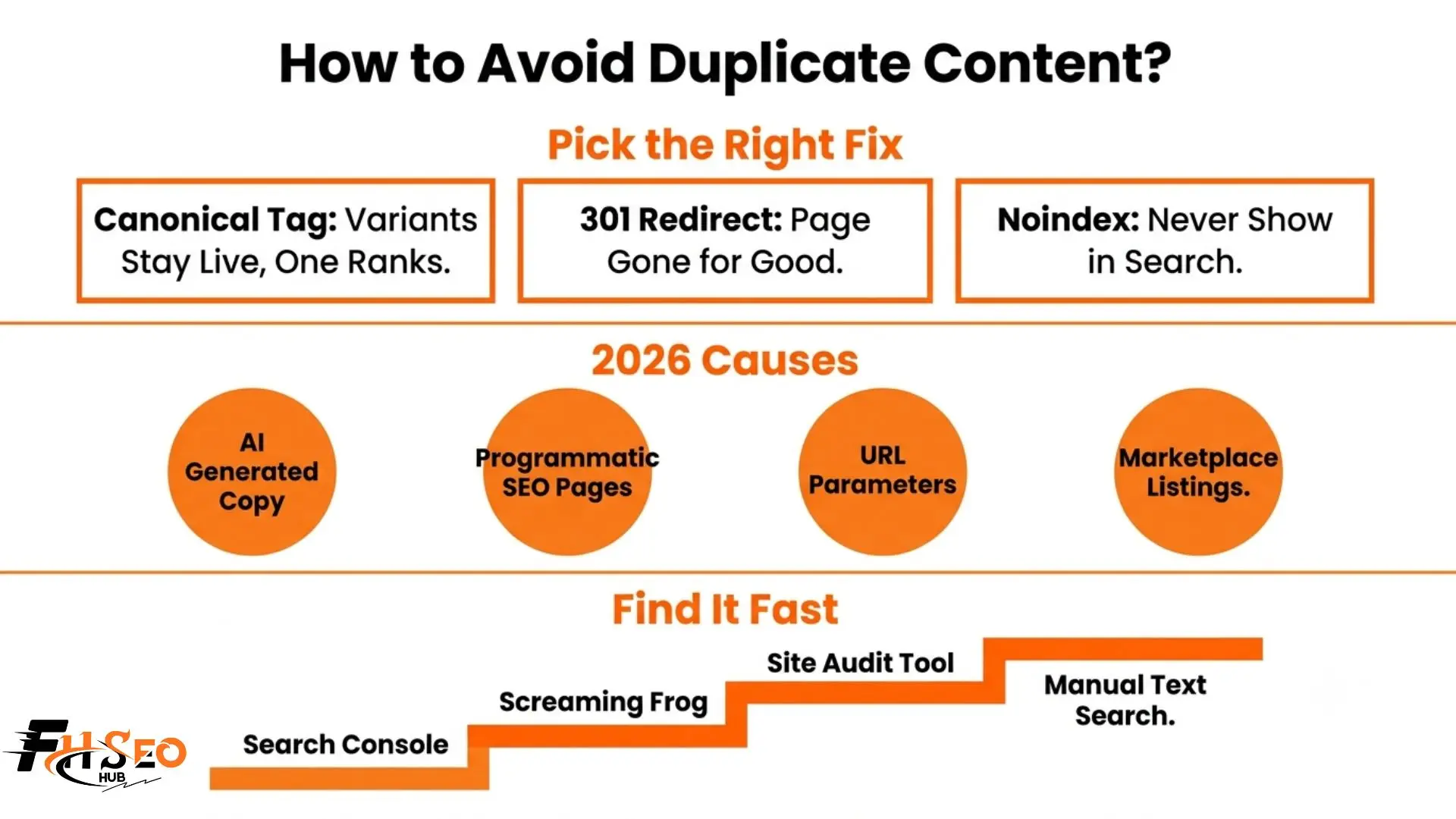
Avoiding duplicate content starts with understanding it does not usually trigger a Google penalty, but it still quietly damages your rankings. This issue splits ranking signals across multiple pages instead of one strong page. The fix is manageable once you know which technical tool solves which specific cause.
Some SEO professionals warn about a penalty tied to this specific issue. Google says there is not one. Both are technically right, and that contradiction confuses more site owners than the actual fixes do.
What Is Duplicate Content?
Duplicate content is identical or nearly identical text that appears on more than one URL. Internal duplication happens within your own site. External duplication spans multiple domains. When the match is close but not exact, it gets called near duplicate content instead, which still causes most of the same problems.
Does it cause a Google penalty? Rarely. Google has said repeatedly there is no direct penalty for accidental duplication. Rankings only drop when this is judged intentional and deceptive, meant to manipulate results. Accidental duplication just gets filtered out of search, not punished outright, which is genuinely reassuring for most site owners who discover the issue by accident rather than design.
Why Does Duplicate Content Hurt SEO If There Is No Penalty?
Duplication damages performance through four indirect paths, not one direct hit.
None of these show up as a penalty notice. They just quietly cap how high your best pages can climb.
What Causes Duplicate Content?
Classic technical causes still show up constantly: URL parameters, session IDs, UTM parameters, HTTP versus HTTPS confusion, www versus non-www variants, trailing slash inconsistency, AMP URLs, mobile subdomains, and staging environments left exposed to search engines by accident.
But two newer causes now drive a lot of what teams deal with today:
AI-generated product and blog copy. When many pages get written using similar prompts against the same AI tool, the output often lands close enough to count as near duplicate content, especially across product variant pages where the underlying facts barely change from item to item.
Programmatic SEO template pages. Template-driven pages built at scale, like city or category variants generated from one base layout, frequently produce thin, repetitive text across hundreds or thousands of URLs. The template structure repeats even when the specific data points differ slightly.
Older sources of the problem still matter too, including tag pages, category pages, pagination, paginated comments, and attachment image URLs that many content management systems generate automatically without asking. WordPress in particular tends to spin up tag archive pages by default, and most site owners never realize these exist until an audit flags them.
How Do You Find Duplicate Content on Your Site?
Start inside Google Search Console. Check the Index Coverage report for three specific warnings: duplicate without a user-selected canonical, duplicate where Google chose a different canonical than you did, and duplicate submitted URLs not selected as canonical.
Set a recurring calendar reminder to rerun this check quarterly. New pages, plugin updates, and CMS changes all reintroduce this issue quietly, often without anyone noticing until traffic dips.
How Do You Fix Duplicate Content Issue With Canonical Tag, Redirect or Noindex?
| Situation | Correct Fix |
| Product variants (size, color) | Canonical tag to the main product page |
| URL parameters, session IDs, UTM parameters | Self-referencing canonical to the clean URL |
| HTTP vs HTTPS, www vs non-www | 301 redirect |
| Trailing slash inconsistency | 301 redirect |
| Staging site, internal search pages | Noindex tag |
| Print-friendly or AMP pages | Canonical tag with rel=”amphtml” |
| Multilingual regional pages | Hreflang, not canonical |
Never combine a noindex tag with a canonical tag pointing elsewhere on the same page. That sends two contradictory signals and Google usually just picks one, often unpredictably.
How Do You Prevent Duplicate Content on Ecommerce Product Pages?
Rewrite manufacturer product descriptions with original details, real user reviews, or unique specifications instead of pasting the catalog text as is. Apply canonical tags across every size and color variant, pointing them all to one main product page so ranking signals consolidate instead of splitting across dozens of near-identical listings.
If the same listing also appears on Amazon or Walmart, that marketplace copy competes directly against your own domain. Prioritize unique, expanded descriptions on your own site specifically, since you control that version completely and it is the one building your long-term SEO value. A quick way to check exposure: search a distinctive sentence from your product page in quotes and see how many marketplaces already carry the identical text.
Does Duplicate Content Affect Whether AI Search Engines Cite Your Page?
Yes. Google AI Overviews, ChatGPT, and Perplexity favor citing sources with distinct, original information over pages that closely mirror other content already indexed elsewhere. Heavy repetition makes a page structurally less likely to get selected as a citable answer, since these systems are actively hunting for the most authoritative, unique version of any given claim before quoting it.
This is a genuinely new stake in 2026. It is no longer just about ranking position in traditional blue links. It is about whether AI search tools trust your page enough to reference it at all when someone asks a question your content could answer. A page buried in a cluster of near-identical variants rarely gets that trust, even if the underlying information is accurate and useful.
How Do You Handle Content Scraping and Syndication?
For syndication you control, ask partners to add a canonical tag pointing back to your original piece, or apply a noindex tag to their copy instead. This keeps your version as the one search engines credit while still letting the partnership exist.
For scraping you did not authorize, contact the site directly first and request removal. Many site owners comply just to avoid legal trouble, and this step alone resolves most cases within a week or two.
If that does not work and the scraped version starts outranking your original, submit a DMCA takedown request through Google’s legal tool. Processing usually takes a few days once the complaint is filed correctly, and Google generally sides with the earliest indexed, verifiable source when the claim is clear.
Final Thoughts
Learning how to avoid duplicate content really comes down to picking the right tool for the specific cause, not memorizing every possible scenario. Canonical tags consolidate variants that should stay live. Redirects handle permanent moves. Noindex hides pages that should never rank at all. Add a quarterly audit habit using Search Console or a crawler, and this stops being an ongoing worry and becomes a five-minute maintenance check instead.
According to my blogging experience at FHSEOHub I always verify or check my content before publishing it on my website to illuminate the issue of duplication of content.
FAQs
Standardize your URL structure with one version each for HTTP versus HTTPS and www versus non-www. Add a canonical tag to every indexable page. Noindex utility pages like staging environments or internal search results. Rewrite product variant pages with original text instead of reused manufacturer copy.
A self-referencing canonical tag on every page, paired with consistent internal linking so you never link to multiple versions of the same URL, is the most reliable method. Combine this with a regular audit using Screaming Frog or Google Search Console to catch new duplication before it spreads further.
It is not directly penalized, but it still hurts performance. It causes keyword dilution, splits link equity between pages, and wastes crawl budget that could otherwise go toward your original content. The damage is indirect but very real, especially at scale on large ecommerce sites.
Duplicate content means the same or nearly identical text appearing on multiple URLs. Thin content is a single page that offers very little value on its own, like a near-empty category page or automatically generated text. A page can be thin without being duplicate, and duplicate without being thin.
Hreflang tags tell search engines that similar content across different language or country URLs are intentional regional variants, not accidental copies. This matters for geotargeting where the same language serves multiple countries. Without hreflang, Google may treat near-identical regional pages as duplicates competing against each other.
Use a canonical tag when the page should stay accessible to users but not compete in search, like product variants. Use a noindex tag when the page should never appear in search at all, like a staging site or print-friendly version. Never combine both on the same page pointing to different goals.