
What Is Website Structure? Types, Examples and SEO Guide

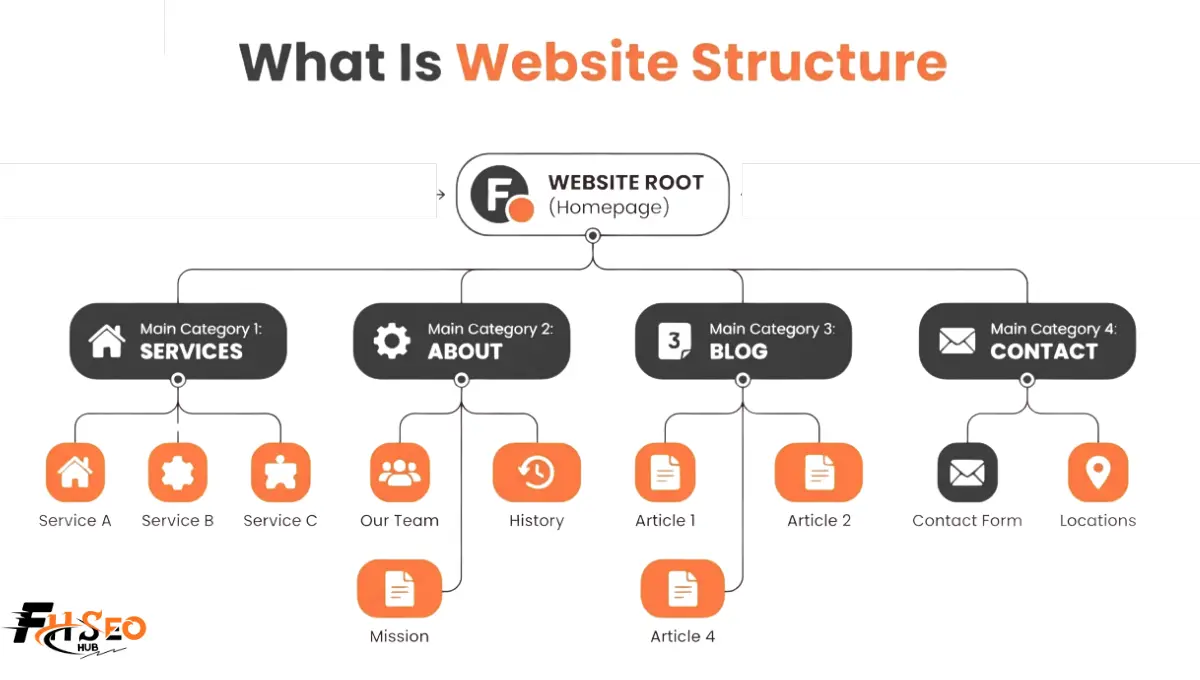
Website structure is an organizational framework, also called website architecture, connecting a site’s homepage, categories and subcategories, and individual content pages through a navigation menu, internal linking, and URL structure. It shapes both how visitors move through a site and how search engines crawl and index it.
The terms structure and architecture get used interchangeably in most practitioner conversations, and that’s fine. Information architecture is the broader discipline behind both, governing how content gets organized, labeled, and connected regardless of which specific structural model a site uses. A blog’s information architecture and an e-commerce site’s information architecture solve the same underlying problem. Both are about getting the right page in front of the right user, or crawler, in the fewest steps possible.
Why Is Website Structure Important?
It matters because it directly controls crawlability, how internal linking distributes authority across pages, and how easily users complete their intended user journey. A weak structure creates orphaned pages search engines never find and forces users through confusing navigation that increases bounce rate.
Search engines rely on your internal linking and sitemap to discover and understand content hierarchy. A page buried five or six clicks from the homepage, with no internal links pointing to it, is genuinely difficult for Googlebot to prioritize. That holds true regardless of how good that page’s content is. On the user side, a confusing structure means visitors give up mid-task rather than finishing a purchase, filling out a form, or finding the article they came for. Structure is the layer beneath every other SEO tactic. Content quality and backlinks matter less if the pages carrying them are structurally invisible.
Types of Website Structure

There are five main types of website structure: hierarchical, sequential, matrix, database, and hybrid, each suited to different content types and user needs. Most real sites end up combining elements from more than one model rather than using a single type in pure form.
| Structure Type | Also Called | Best For |
| Hierarchical | Tree model | Blogs, corporate sites, e-commerce category pages |
| Sequential | Linear model | Checkout flows, onboarding, step-by-step guides |
| Matrix | Web or webbed model | Content with tags, filters, cross-topic relationships |
| Database | Dynamic model | Large inventories, marketplaces, user-generated content |
| Hybrid | Mixed model | Most production sites, combining the above by section |
Hierarchical Structure
Hierarchical structure, also called the tree model, organizes content in a top-down parent-child relationship. It starts at the homepage and branches into categories and subcategories, then individual content pages, similar to a company org chart.
This is the most common structure for blogs, corporate sites, and e-commerce categories, since it maps naturally onto how most content is already organized by topic. The clear parent-child relationship also makes taxonomy management genuinely simpler. A new subcategory slots into the existing tree without requiring a structural rethink. The risk is rigidity. If the hierarchy grows too deep, click depth increases past a healthy range and pages buried several levels down become harder to crawl and rank.
Sequential (Linear) Structure
Sequential structure, or the linear model, guides users through a fixed, step-by-step path where each page leads directly to the next. It’s commonly used for checkout flows, onboarding sequences, and tutorial content where order genuinely matters.
Unlike hierarchical structure, sequential structure isn’t really built for SEO discovery. Its job is completion, not exploration. A checkout flow doesn’t need to rank in Google. It needs the user to reach step four without abandoning the process. Real problems show up when sequential pages get treated as standalone content that should also rank independently. That usually means they need separate internal linking treatment outside the linear flow itself.
Matrix (Web) Structure
Matrix structure, also called the web model or webbed model, connects pages through multiple cross-links, tags, and filters rather than a single rigid hierarchy. Users can move between related content in whatever order suits their intent.
This model fits content-heavy sites where topics genuinely overlap, news sites, resource libraries, sites using extensive tagging. A single article might connect to five other pages through shared tags, related posts, and contextual links, none of which requires a strict parent-child relationship. The tradeoff is that a pure matrix structure with no underlying hierarchy at all can confuse both users and crawlers about which pages matter most. Most sites that use matrix elements layer them on top of a hierarchical foundation rather than replacing it.
Database (Dynamic) Structure
Database structure, or the dynamic model, generates pages on demand from a database rather than as static, pre-built pages. It’s the model behind large e-commerce catalogs, marketplaces, and any site where content is pulled dynamically based on user queries or filters.
Amazon and Airbnb are the standard reference examples here. Neither hand-builds millions of individual pages. Both generate them from underlying data as users search and filter. For SEO, this creates a genuine tension. Dynamic generation makes near-infinite content possible. It also makes near-infinite duplicate and thin-content pages possible, if filters and parameters aren’t controlled through canonical tags, robots.txt rules, or careful URL structure decisions.
Hybrid Structure
Hybrid structure combines elements from two or more of the other models within a single site. Typically that means hierarchical navigation as the main framework, matrix-style cross-linking layered on top, and sequential flows used only where a specific task requires them.
This is genuinely how most production sites work, whatever the marketing copy on an agency’s homepage claims about a single “proprietary” structure. A SaaS marketing site might use hierarchical structure for its main navigation and database structure for a dynamic pricing or integrations page. It might also run a sequential flow for its signup process, all on the same domain. Treating hybrid as the honest default, rather than a special fifth category, tends to produce better planning decisions than forcing a site into one pure model.
Key Components of a Website Structure
A functional structure depends on several components working together. That includes the homepage as the primary entry point, a clear navigation menu, consistent internal linking, and a logical URL structure. It also includes an XML sitemap for search engines, often an HTML sitemap for users, breadcrumbs, and a well-organized footer.
Categories and subcategories are the organizing logic underneath most of these components, and getting that taxonomy right early tends to matter more than any individual component listed above. A clean taxonomy is what lets breadcrumbs, navigation, and URL structure all stay consistent with each other instead of drifting apart as the site grows.
How Website Structure Impacts UX
Structure impacts UX by determining how quickly and confidently users complete their user journey, whether that’s finding information, comparing products, or completing a transaction. Confusing navigation and inconsistent content hierarchy are consistently cited as reasons users abandon a site before converting.
A user shouldn’t have to think about where they are in a site’s structure, whatever the user flow leading them there. Breadcrumbs, a consistent navigation menu, and logical categories and subcategories all work together to make location and next steps obvious without conscious effort. When that fails, the practical cost shows up as higher bounce rate, shorter session duration, and lower conversion on task-based flows like checkout or lead forms. This is also where sequential structure earns its place. Forcing a checkout flow into a general hierarchical navigation, with a full menu and unrelated links available mid-transaction, reliably increases abandonment. A focused, linear sequence with no exit points performs better.
How Website Structure Impacts SEO
Structure impacts SEO primarily through crawlability and how internal linking distributes ranking signals across a site. A flatter structure keeps important pages within three to four clicks of the homepage. That generally makes crawling and indexing more efficient than a deep structure that buries content many levels down.
The flat versus deep debate has mostly settled into a hybrid answer in current practice. Keep genuinely important, revenue-driving pages shallow and close to the homepage. Supporting or long-tail content can sit deeper, as long as it’s still reachable through internal linking rather than isolated. This is also where silo architecture comes in. Grouping related content into a clear topic silo reinforces topical authority for search engines while keeping the actual click depth reasonable. A pillar page links down to supporting cluster pages, which link back up to it. Cornerstone content is the small set of pages representing a site’s most important, comprehensive coverage of a topic. It should generally sit at the top of its silo and receive internal links from as much related content as makes sense. For AI-driven search and AI Overviews specifically, this same clean parent-child grouping matters even more than it used to. A structure with obvious topic relationships and consistent breadcrumbs gives an AI system an easier path to understanding what a page is about. It also shows how that page relates to the rest of the site. That affects citation likelihood in ways flat keyword optimization alone doesn’t.
How to Plan and Build a Website Structure (Step-by-Step)
Planning starts with content and keyword research to establish topics and hierarchy, then moves through wireframing navigation, defining URL structure, and validating click depth before development begins.
- Audit or research your content topics. List every topic and subtopic the site needs to cover, grouping naturally related ones together before deciding on structure.
- Choose a primary structural model. Most sites default to hierarchical as the foundation, adding matrix-style cross-linking or sequential flows only where the content genuinely needs them.
- Map the taxonomy. Define categories and subcategories explicitly, aiming for a depth that keeps important pages within three to four clicks of the homepage.
- Design the navigation menu and URL structure together. URLs should reflect the same hierarchy the navigation menu shows, so a category page’s URL and its position in the menu tell the same story.
- Plan internal linking patterns, including breadcrumbs. Decide how pillar and cluster pages will link to each other before writing content, rather than adding internal links as an afterthought once pages exist.
- Build the XML sitemap and confirm robots.txt doesn’t block anything important. A sitemap that includes pages your robots.txt disallows sends contradictory signals to crawlers.
- Test click depth and look for orphaned pages before launch. A crawler like Screaming Frog can surface both issues quickly, before they become a live-site problem.
Realistic timelines vary with site size. A small site’s structure can be planned and validated in a few days. A large e-commerce or enterprise site with thousands of SKUs or pages typically takes several weeks of taxonomy work before development starts. Restructuring an existing large site afterward is considerably more expensive than planning it correctly the first time.
Common Website Structure Issues and How to Fix Them
The most frequent structure problems are orphaned pages with no internal links pointing to them, and excessive click depth burying important content. Inconsistent URL structure and navigation menus that don’t reflect the actual content hierarchy round out the list.
- Orphaned pages. Pages with zero internal links pointing to them are difficult for crawlers to find and receive no internal link equity. Fix this by auditing internal links regularly and ensuring every page connects to at least one relevant parent or sibling page.
- Excessive click depth. Important content buried five or more clicks deep gets crawled less frequently and ranks worse on average. Fix this by adding contextual internal links from higher-level pages, or by restructuring the taxonomy so fewer intermediate category layers exist.
- Inconsistent URL structure. URLs that don’t reflect the actual content hierarchy, or that mix conventions across sections, confuse both users and crawlers. Fix this with a documented URL convention before building new sections, and by using 301 redirects carefully if existing URLs need to change.
- Navigation and taxonomy drift. As sites grow, new content often gets bolted onto the nearest existing category rather than placed correctly, which is a common source of keyword cannibalization between pages competing for the same intent. Fix this with periodic taxonomy audits rather than letting the structure drift indefinitely.
- Missing or broken breadcrumbs. Breadcrumbs that don’t match the actual URL hierarchy undermine the parent-child signal they’re meant to reinforce. Fix this by generating breadcrumbs programmatically from the same taxonomy data driving navigation, rather than setting them manually per page.
Website Structure Examples
Real sites tend to make their structural choices obvious once you know what to look for. An e-commerce site typically uses hierarchical structure for its main category navigation, layered with database structure for product listing and filtering, and a sequential structure for checkout specifically.
A content publisher or blog usually runs on a mostly hierarchical structure, categories and subcategories organizing posts, with matrix-style elements added through tags and related-post modules. A SaaS marketing site commonly separates its structure by function. Hierarchical navigation covers the main marketing pages. A resource center or blog often adopts a hub-and-spoke pattern that functions as a form of silo architecture. The signup or trial flow, meanwhile, runs sequentially outside the main navigation entirely. A local service business site tends to use a flatter, shallower hierarchy than any of these. It usually has fewer total pages, and benefits more from keeping everything within one or two clicks than from an elaborate taxonomy it doesn’t have enough content to fill.
How to Maintain and Improve Your Website Structure
Maintaining it requires periodic audits for orphaned pages, click depth drift, and outdated navigation, since structure tends to degrade gradually as new content gets added without deliberate planning.
Run a full crawl every few months on an active site, more frequently on a large or fast-growing one. Check specifically for orphaned pages, broken internal links, and category pages that have quietly become too deep. Content pruning, removing or consolidating thin, outdated, or redundant pages, is one of the more underused maintenance tactics here. A bloated taxonomy full of thin category pages dilutes the internal linking signal to the pages that genuinely matter. When restructuring an established site, stage the change carefully and use 301 redirects for every URL that moves. A poorly executed structural overhaul can tank rankings that took years to build. Most experienced practitioners treat structure as a living system that needs quarterly attention, not a one-time setup decision made at launch and never revisited.
Conclusion
Website structure is the framework everything else in SEO and UX sits on top of. Treating it as a one-time setup decision rather than an ongoing discipline is one of the more common mistakes across otherwise well-run sites. Pick a structural model that matches how your content genuinely works. Hierarchical should be the default foundation for most sites, layered with matrix, sequential, or database elements only where the content genuinely calls for them. Keep important pages shallow, audit for orphaned pages and click depth drift regularly, and treat your taxonomy as something that needs deliberate maintenance as the site grows. Get the structure right and the rest of your SEO work has somewhere solid to stand.
FAQs
Website structure in SEO refers to how a site’s pages are organized and connected through navigation, internal linking, and URL structure. That organization affects crawlability, indexing, and the distribution of ranking signals across the site.
The main types are hierarchical (tree), sequential (linear), matrix (web), database (dynamic), and hybrid, which combines elements from the others. Most real sites end up using a hybrid approach rather than one pure model throughout.
There’s no single best structure for every site, but current practice generally favors a hybrid approach. That means a flatter hierarchy keeping important pages within three to four clicks of the homepage, combined with silo-style grouping for topical authority.
Click depth is the number of clicks needed to reach a page starting from the homepage. Pages several clicks deep tend to get crawled less often and rank worse on average, which is why keeping important content shallow is a core structural priority.
An orphaned page is a page with no internal links pointing to it from anywhere else on the site. Search engines have a much harder time discovering and prioritizing orphaned pages, even if they’re listed in an XML sitemap.
Information architecture is the broader discipline governing how content gets organized, labeled, and connected. Website structure is the specific organizational model, hierarchical, sequential, matrix, database, or hybrid, that a site’s information architecture gets built on.
Silo architecture is a specific approach within hierarchical structure. It groups related content into pillar and cluster pages that link tightly within a topic, while limiting links across unrelated topics, to reinforce topical authority.
It does, and this is genuinely underdiscussed. Clean parent-child topic relationships make it easier for AI systems to understand what a page covers and how it relates to the rest of a site’s content. Consistent breadcrumbs and internal linking are what reinforce that relationship.


