
What Are Orphan Pages: How to Find and Fix Them

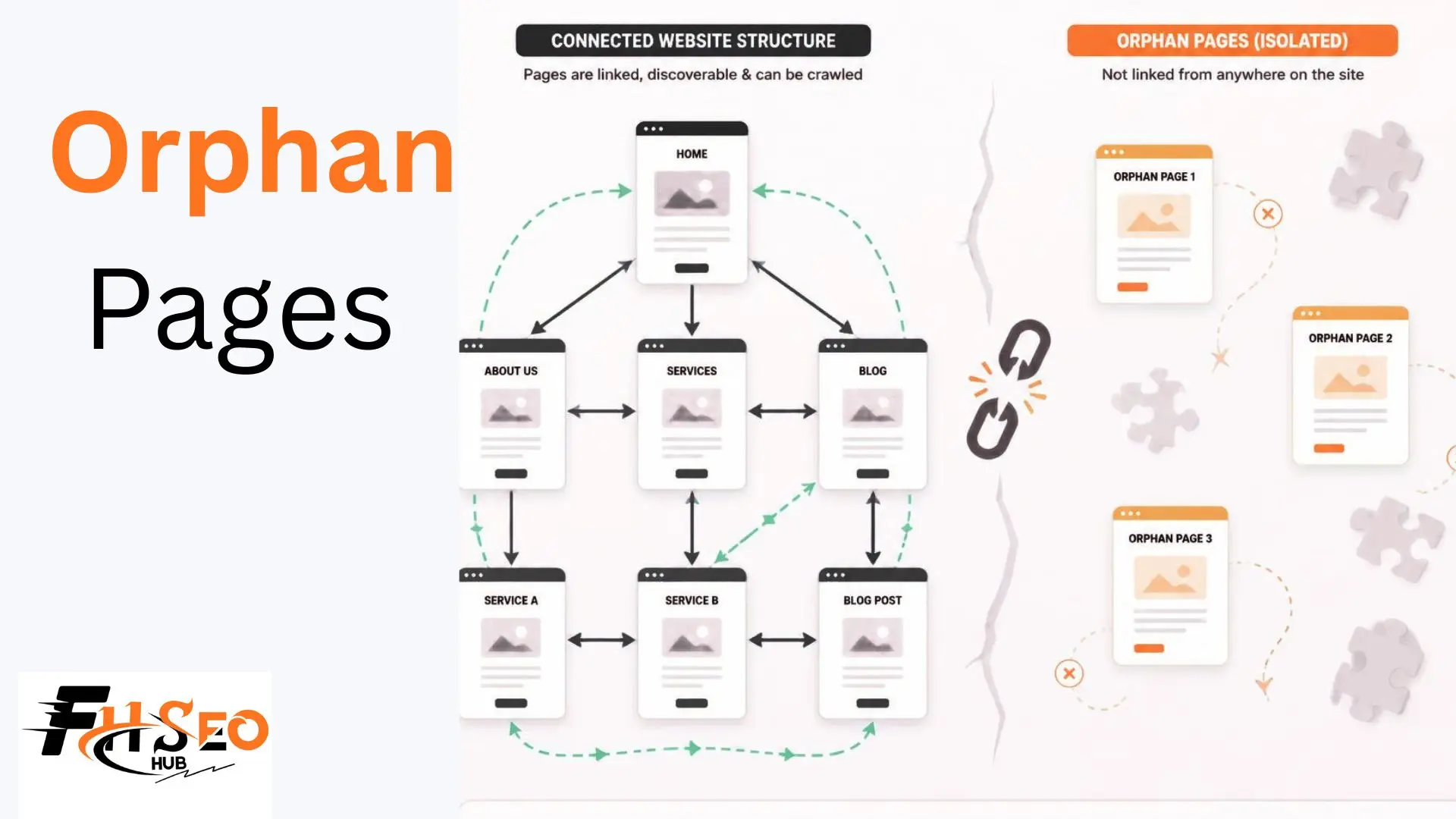
Orphan pages are pages that exist on your site but have no internal links pointing to them, which makes them hard for both users and crawlers to discover even when they’re technically live and indexable. A site can have hundreds of orphan pages without anyone noticing, since they don’t show up in normal browsing and often keep generating impressions in Search Console while quietly wasting crawl budget.
This guide covers what causes orphan pages and the specific data sources you need to find them. It also covers a decision framework for fixing each one correctly, and why they matter more now that AI crawlers are mapping the web alongside Googlebot.
What Are Orphan Pages?
An orphan page is any URL on your site with zero internal links pointing to it, regardless of whether it’s included in your XML sitemap, indexed by Google, or receiving organic traffic. Sitemap inclusion and indexing are separate from internal linking. A page can be indexed and still be an orphan.
The confusion here trips up a lot of site audits. A page showing impressions in Search Console looks healthy at first glance. But if no other page on your site links to it, Google found it through the sitemap alone, not through your site’s actual link structure. That page gets no link equity from your internal linking, and its crawl priority stays low regardless of how good the content is.
Orphan pages differ from pages blocked by robots.txt or tagged noindex. Those are deliberately excluded. An orphan page is usually just forgotten, a page that exists, works fine, and would perform better with normal internal linking, but nobody built the links.
Intentional vs. Accidental Orphan Pages
Most orphan pages are accidental, created by site migrations, navigation redesigns, or content that got published without a plan for how visitors would reach it. A smaller share are intentional, PPC landing pages built specifically to stay outside normal navigation and internal search.
Intentional orphan
Intentional orphan pages exist for real reasons. A landing page built for a paid campaign often shouldn’t appear in main navigation or get linked from blog content, since mixing paid traffic pages into organic structure can distort both. These pages are usually fine to leave unlinked, as long as they’re deliberately excluded rather than just missed.
Accidental orphan
Accidental orphan pages are the real problem. A product page that goes out of stock and gets unlinked from category pages is one common example. A blog post published without adding it to any hub or related-content section is another. An old page that survived a navigation redesign with no new links pointing to it is a third. All three fall into the accidental category, and they’re the ones worth actively hunting down.
Common Causes of Orphan Pages
The most common causes of orphan pages are site migrations, navigation changes, out-of-stock products losing their category links, and content published without a deliberate internal linking plan. Each cause leaves a different, traceable pattern in your site structure.
Site migrations are the single biggest source. A URL structure change, a CMS switch, or a redesign that rebuilds navigation from scratch often leaves old pages technically live but disconnected from the new link structure. This happens especially when redirects were mapped for SEO value but internal links weren’t rebuilt to match. Navigation changes cause a similar problem on a smaller scale: removing a category from the main menu without checking what pages relied on that navigation path for discovery.
Out-of-stock products are a recurring ecommerce-specific cause. A product goes unavailable, gets pulled from category and collection pages, and quietly becomes an orphan even though the URL still resolves and might return to stock later. Content published without a linking plan, a blog post added to the CMS with no internal link added from any existing page, is the most avoidable cause and the easiest to prevent going forward.
Why Orphan Pages Are Bad for SEO

Orphan pages hurt SEO because they receive no internal link equity, get crawled less frequently, and signal low importance to search engines regardless of the content’s actual quality. A genuinely strong page performs below its potential when nothing on your site treats it as worth linking to.
Crawl budget waste compounds this on larger sites. Search engines allocate limited crawl attention to any given domain, and pages your own site doesn’t link to get deprioritized in that allocation. This matters especially on sites with thousands of URLs where crawl budget is already stretched thin. An orphan page isn’t crawled as often as a well-linked one, which means content updates take longer to get noticed and re-indexed.
The link equity problem is the clearest cost. PageRank flows through internal links the same way it flows through backlinks. A page with zero internal links pointing to it gets none of that internal authority distribution, no matter how many backlinks it might have from external sites. That’s a page competing at a real disadvantage against every properly-linked page on the same site.
How to Find Orphan Pages: The Data Sources You Need
Finding orphan pages requires cross-referencing three separate data sources.
- The first is your site’s real internal link structure from a crawl.
- The second is your declared URLs from Google Search Console, Google Analytics, and your XML sitemap.
- The third is your server logs showing what search engines genuinely request.
Any URL that appears in the second or third source but not the first is a genuine orphan.
Start with a full site crawl using Screaming Frog or Sitebulb, crawling from the homepage the way a search engine would, following only internal links. This produces your “known network,” the pages your site structure genuinely connects to. Export the complete URL list from Search Console and your XML sitemap next. This is your “declared network,” everything you’ve told Google exists whether or not it’s linked.
Server logs are the most reliable third source, since they show what Googlebot and other crawlers genuinely requested, not what a tool assumes should be crawlable. Filter log data for 200-status requests from verified search bot user agents, then compare that list against your crawl data. Any URL present in your sitemap or logs but absent from your crawl results is an orphan page, confirmed rather than inferred.
Best Tools for Finding Orphan Pages
Screaming Frog and Sitebulb both offer dedicated orphan page detection by cross-referencing a crawl against sitemap and Search Console data. Ahrefs and Semrush include orphan page filters directly inside their automated Site Audit modules for a faster, less manual process.
| Tool | Best For | Key Limitation |
| Screaming Frog | Dedicated orphan URL reports, log file cross-referencing | Free version caps at 500 URLs, paid license required for larger sites |
| Sitebulb | Visual site architecture maps showing isolated pages | Better suited to sites over 10,000 URLs where visualization adds real value |
| Ahrefs Site Audit | Fast, automated orphan detection inside existing Site Audit workflow | Requires an active Ahrefs subscription |
| Semrush Site Audit | Automated checks alongside 140-plus other technical issues | Same subscription dependency as Ahrefs |
| JetOctopus / Botify / OnCrawl | Enterprise-scale log analysis and crawl budget mapping | Overkill and costly for sites under roughly 50,000-100,000 pages |
For most sites, Ahrefs or Semrush’s built-in orphan page filter is the fastest starting point, since it skips the manual cross-referencing step entirely. Screaming Frog’s dedicated Log File Analyser adds real value once you need to confirm actual crawler behavior, not just theoretical link structure, particularly on larger sites where crawl budget genuinely matters.
How to Fix Orphan Pages: A Decision Framework
Fixing an orphan page depends on whether the content is genuinely worth keeping. Add internal links to pages with real value or existing traffic, redirect or delete pages that no longer serve a purpose, and leave intentional orphans, like PPC landing pages, alone entirely.
Check three things before deciding: does the page have organic traffic or impressions in Search Console, does it have any backlinks worth preserving, and does it still serve a genuine purpose for users. A page with real traffic or backlinks and no internal links is a high-priority fix, since it’s actively losing value it should be capturing. A page with none of those signals and outdated content is a stronger candidate for removal than for rescue.
Don’t default to adding links everywhere as the safe choice. Linking to a genuinely low-value orphan page just to eliminate it from an audit report can dilute link equity across your site rather than improving it. The decision needs to weigh whether the page deserves the link equity it would receive, not just whether it technically has zero links right now.
Internal Linking, Noindex, Redirects, or Deletion: When to Use Each
Use internal linking for pages with genuine value or existing traffic. Use noindex for pages that should stay live but stay out of search results. Use a 301 redirect for pages replaced by better content, and deletion with a 410 status code for content with no remaining value or search demand.
Fix When to Use It What It Signals to Google Add internal links Page has traffic, backlinks, or genuine ongoing value This page matters, treat it accordingly Noindex tag Page should exist for users but not compete in search results Don’t index this, but it’s not gone 301 redirect Content has been replaced or consolidated elsewhere This URL’s value now lives at a new address Delete with 410 No remaining value, no search demand, no backlinks worth preserving This is permanently gone, stop trying to crawl it
The 404 versus 410 distinction matters more than most site owners realize. A 404 tells search engines a page is missing but might come back, so they keep checking periodically. That wastes crawl budget on a page that’s genuinely never returning. A 410 explicitly signals permanent removal, and search engines generally stop trying to recrawl it faster than they would a 404. Use 410 deliberately for content you’re certain won’t return.
Orphan Pages vs. Dead-End Pages: What’s the Difference?
Orphan pages have no internal links pointing to them, while dead-end pages have no internal links pointing away from them. One is a discovery problem, the other is a navigation problem, and a single page can technically be both at once.
A dead-end page might be perfectly well-linked from the rest of your site, so users and crawlers find it easily. But once there, they hit a wall: no related content links, no path back into your site structure beyond the browser’s back button. This hurts user engagement and crawl depth in a different way than an orphan does, since the crawler discovered the page fine but has nowhere new to go from it.
Fixing a dead-end page means adding outbound internal links from that page to related content, the opposite structural direction from fixing an orphan. A thorough site architecture review checks for both problems together, since a site with widespread orphan pages often has dead-end pages too, both symptoms of the same underlying lack of a deliberate internal linking strategy.
Orphan Pages and AI Search Visibility
Orphan pages are invisible to AI crawlers the same way they’re invisible to Googlebot. A page with no internal links can’t get cited in AI Overviews or LLM-generated answers, regardless of how well the content itself would answer the query. AI crawlers like GPTBot map the web using many of the same discovery signals traditional search engines use, including internal link structure.
This is a newer stake most orphan page content hasn’t caught up to. A well-written guide sitting as an orphan page loses out on two visibility channels at once now, not just one: traditional organic rankings and citation in AI-generated answers. Server log analysis increasingly needs to track AI crawler user agents alongside Googlebot specifically, since a page invisible to GPTBot is missing out on a growing share of how people encounter information now.
The fix doesn’t change, internal linking still solves the underlying discovery problem for both traditional and AI crawlers. What changes is the cost of leaving it unfixed, since an unlinked page now forfeits visibility across a wider set of discovery paths than it did even a couple of years ago.
How to Prevent Orphan Pages Going Forward
Prevent orphan pages by requiring a minimum number of internal links before any new page publishes, and by auditing navigation and category changes for their impact on existing pages before making them live. A one-link rule, no page ships without at least one internal link from an existing, relevant page, catches the most common accidental cause at the source.
Build this into your publishing workflow directly rather than treating it as a periodic cleanup task. Require the person publishing new content to identify and add at least one contextual internal link from a relevant, already-indexed page before the new page goes live, not after. This is far cheaper than discovering the gap in a quarterly audit months later.
For ecommerce specifically, build a rule into your process for what happens to a product page when it goes out of stock. Keep it linked with an “out of stock, notify me” state rather than pulling it from category pages entirely, unless the product is genuinely discontinued. For site migrations and navigation redesigns, map internal links alongside URL redirects, not as a separate afterthought, since redirect mapping alone doesn’t rebuild the internal linking that made those pages discoverable in the first place.
Ongoing Monitoring: How Often to Check
Check for orphan pages quarterly on most sites. Check monthly on large, frequently-updated sites like ecommerce catalogs or high-volume publishers, where new pages and inventory changes happen constantly. A site that only checks after a migration or a major redesign misses the slower, ongoing accumulation that happens between those events.
Set up recurring crawls through whichever tool you’re already using, Screaming Frog, Sitebulb, Ahrefs, or Semrush, and compare orphan page counts over time rather than treating each audit as a one-off snapshot. A rising trend between audits signals a process problem, content getting published without proper linking, that’s worth fixing at the workflow level, not just patching case by case.
Conclusion
Orphan pages are a discovery problem hiding in plain sight: content that’s live, often decent, and completely invisible to the internal linking structure that would help it rank and get cited. Finding them takes real cross-referencing, a crawl, your sitemap and Search Console data, and ideally your server logs, not just a glance at your navigation menu. Fix the ones worth keeping with genuine internal links, remove the ones that aren’t, and build a one-link rule into your publishing process so the next batch of orphan pages doesn’t quietly accumulate the same way this one did.
FAQs
Cross-reference a full site crawl against your XML sitemap and Search Console URL list. Any page that appears in your sitemap or Search Console data but doesn’t show up in your crawl’s internal link structure is an orphan, regardless of whether it’s indexed or receiving traffic.
Yes, if it’s included in your XML sitemap or has external backlinks, Google can still find and index it. It generally underperforms compared to a properly internally-linked page, since it receives no internal link equity and gets crawled less frequently.
It depends on whether the page still has value. Redirect pages that have been replaced by better content or that still get meaningful traffic or backlinks. Delete with a 410 status code pages with no remaining search demand, no backlinks worth preserving, and no ongoing purpose.
Yes, especially on larger sites. Search engines allocate limited crawl attention per domain, and pages your own internal linking doesn’t prioritize get crawled less often, which slows down how quickly content updates get noticed and re-indexed.
Technically, just one. A single internal link from any crawlable, indexed page removes orphan status. In practice, one link is a weak signal of importance, so pages you genuinely want to rank well benefit from multiple contextual links from relevant pages, not just the minimum needed to avoid orphan status.


