Backlink Indexing: How to Get Links Indexed Faster

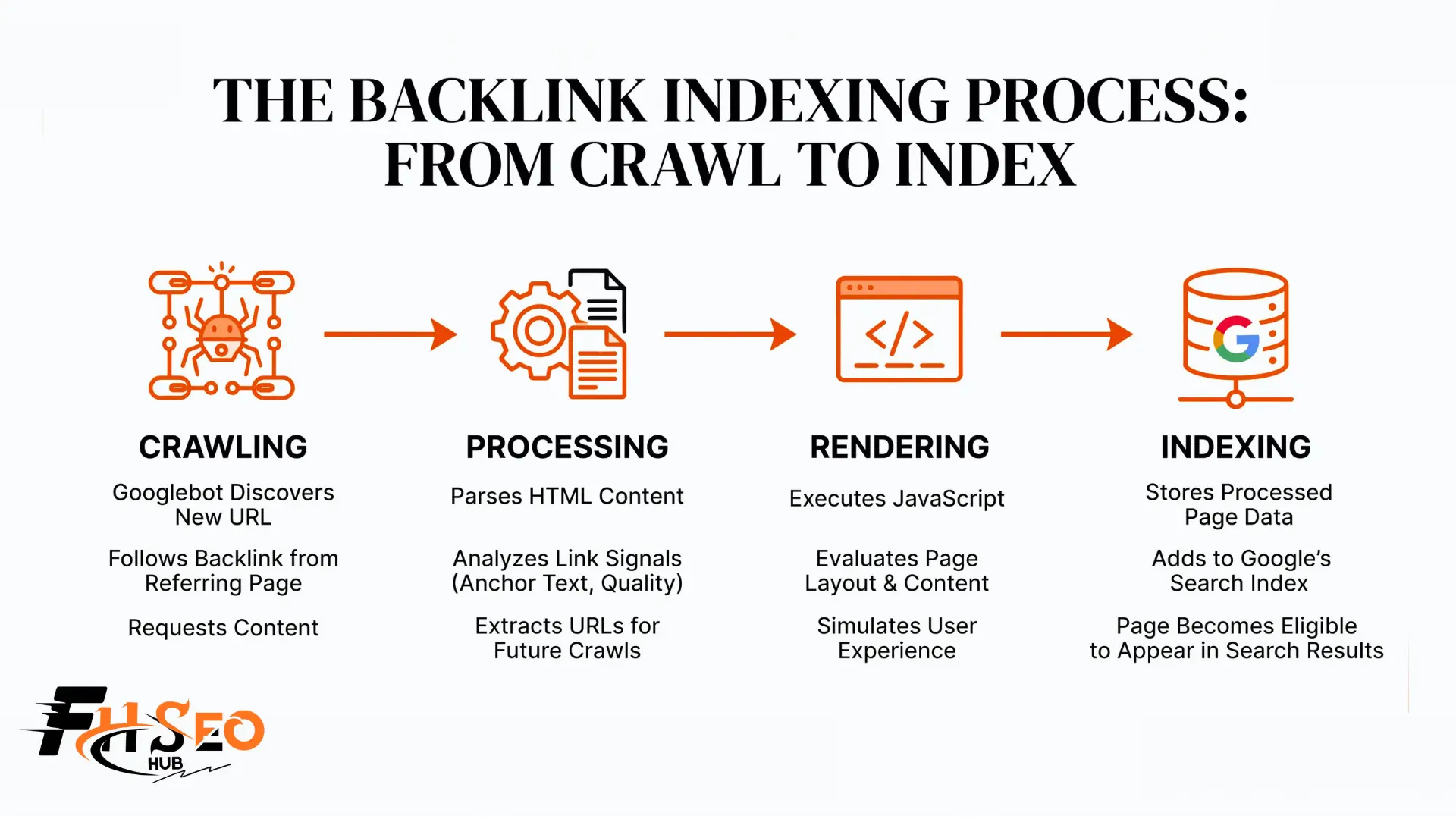
Backlink indexing is the process of getting Google to crawl and store the page hosting your backlink so that link can actually pass value. A backlink does nothing for your rankings until the page it sits on gets indexed, and industry estimates suggest somewhere between 30 and 60 percent of newly built backlinks never make it into Google’s index at all.
If you have paid for a batch of guest posts or niche edits, waited six weeks, and watched your rankings sit completely still, this is almost always why. The links are not weak. They are invisible, because nobody checked whether Google ever found them.
What Is Backlink Indexing?
This means Google’s crawlers have discovered the page containing your backlink, evaluated it, and added it to the index Google actually searches. Crawling and indexing are two separate steps: a page can get crawled and still not get indexed if Google decides it is thin, duplicate, or low value.
Until that page is indexed, the backlink profile you paid for or earned is not really a backlink profile yet. It is a list of URLs sitting outside Google’s index, contributing nothing.
Why Is Backlink Indexing Important?
An unindexed backlink passes zero link juice, which means it does nothing for your domain authority or your rankings no matter how relevant the link is. Even genuinely high-quality backlinks do nothing until the page hosting them gets indexed, and every dollar spent on a link that never gets there is a dollar spent on nothing.
This matters more than most link building content admits. That 30 to 60 percent never-indexed range is not a fringe outlier, it is a normal outcome when links sit on inactive pages, low-authority domains, or sites Google crawls infrequently. Large sites face this compounded by crawl budget limits, where Google allocates a finite amount of crawling attention and prioritizes pages it already trusts.
How Long Does Backlink Indexing Take?
Most backlinks on active, previously indexed pages get crawled within days. Backlinks on brand-new or rarely-updated domains can take weeks or, in some cases, never get indexed without intervention.
Domain age and link relevance both affect this timeline. A link on an established, frequently crawled site with real organic traffic tends to index faster than the same link on a brand-new domain with no crawl history, since Google has no existing trust signal to prioritize that domain’s pages. Contextual relevance matters too. A link embedded in a topically relevant paragraph gets evaluated faster than one sitting in an unrelated footer, since Google’s systems weigh the surrounding content when deciding whether a page deserves attention.
10 Proven Methods to Speed Up Backlink Indexing
1. Confirm the Linking Page Is Actually Indexed First
Before doing anything else, check whether the page hosting your backlink is indexed at all. This diagnostic step gets skipped constantly, and it is the single fastest way to find out if you have an indexing problem or a ranking problem, which need completely different fixes.
2. Prioritize In-Content, Contextual Placement
Links placed inside the main body content index faster than links in a footer, sidebar, or author bio box. Google’s systems evaluate the text around a link to judge relevance, and body content simply gets more crawl attention than boilerplate sections repeated across every page on a site.
3. Request Indexing via Google Search Console’s URL Inspection Tool
Paste the URL into the URL Inspection Tool and click Request Indexing if it comes back as not indexed. This is a manual indexing request, free, and the most direct signal you can send Google, though the daily limit sits at roughly 10 to 12 requests per property, occasionally reported as high as 20, and Google does not publish the exact number.
4. Submit or Refresh Your XML Sitemap
An updated XML sitemap tells Google exactly which pages exist and when they last changed. If you control the linking site, or a partner does, adding the page to their sitemap (including a video sitemap where relevant) gives crawlers a direct discovery path instead of relying on random crawl patterns.
5. Build Internal Links to the Linking Page
Internal linking from other indexed pages on the same domain gives Google an additional crawl path straight to the page hosting your backlink. This works even when you do not control the site, since site owners frequently accept a request to link a new guest post from their own homepage or a relevant category page.
6. Share the URL on Social Media (and Web 2.0 Platforms, With Caveats)
Social media sharing on platforms Google crawls frequently can nudge discovery along, particularly on sites with high crawl frequency. Older Web 2.0 platforms like legacy blogging sites still get mentioned in indexing guides, but most carry thin authority in 2026 and should be treated as a minor supporting signal, not a real strategy.
7. Use RSS Feeds and Content Syndication
Feeding a new page’s URL through an active RSS feed or a legitimate content syndication network gives crawlers another path to discover it. This works best when the syndication destination itself is a real, indexed, active site rather than a feed aggregator nobody visits.
8. Ping With IndexNow (Bing/Yandex, Not Google)
IndexNow is a real, free protocol that instantly notifies participating search engines when a URL changes, but Google has evaluated it since 2021 and still does not support it as of 2026. IndexNow speeds up discovery on Bing, Yandex, Naver, and Seznam only. For Google specifically, rely on Search Console and sitemaps instead, and treat any tool claiming IndexNow “gets you indexed on Google” as a sign the vendor does not understand the protocol.
9. Keep Link Diversity and Anchor Text Natural
A backlink profile with diverse anchor text and varied referring domains reads as organic to Google’s systems, and organic-looking link patterns get indexed and trusted faster than a suspiciously uniform one. Heavy exact-match anchor repetition across new links is itself a signal that can slow evaluation, not just a penalty risk.
10. Choose Niche Edits Over Brand-New, Unindexed Pages
A niche edit adds your link into a page Google has already crawled, indexed, and trusts, which sidesteps the entire indexing problem this article is about. A brand-new guest post has to earn indexing from zero; a niche edit inherits the host page’s existing crawl history.
| Method | Controls Indexing For | Works On |
| Google Search Console | Individual URLs, manually | Google only |
| XML Sitemap | Bulk discovery | Google, Bing, all major engines |
| Google Indexing API | JobPosting/BroadcastEvent pages officially | Google only |
| IndexNow | Instant push notification | Bing, Yandex, Naver, Seznam (not Google) |
The Google Indexing API deserves its own note here because it gets misrepresented constantly. Officially, Google restricts it to pages using JobPosting or BroadcastEvent schema markup. Many SEOs use it for general blog and service pages anyway, and Google has not broadly enforced the restriction as of 2026, but using it outside its documented scope sits against the published terms, and access could be revoked without notice. Treat this as a real, if currently dormant, risk rather than a safe workaround.
Consider Third-Party Indexing Services
Paid third-party indexing services promise to force Google to crawl your links faster, usually through bulk pinging or “crawl steering” techniques. Some of the marketing around these tools is close to indistinguishable from spam, including near-identical advertorial content republished across dozens of unrelated “news” sites promoting the same handful of tools.
That does not mean every third-party indexer is worthless, but it does mean the category needs real scrutiny before you pay for it. A legitimate service should be transparent about its method, offer a partial refund or credit for URLs it fails to index, and avoid relying purely on old-generation spam-ping techniques that search engines have gotten better at recognizing and discounting. Exhaust the free options first: Search Console, sitemaps, and solid internal linking cost nothing and solve the majority of genuine indexing problems on their own.
How to Check If Your Backlinks Are Indexed
The fastest check is a site search operator: search site: plus the exact URL of the page hosting your backlink. If nothing appears, the page is not indexed. For a more reliable read, use the URL Inspection Tool in Google Search Console on properties you own, or check Ahrefs or a similar backlink tool to confirm a third-party link is showing up in their index, which is a strong proxy for Google’s.
For sites that matter on Bing, Bing Webmaster Tools offers its own URL inspection feature worth checking separately, since Bing’s index and Google’s do not always match. Build a habit of backlink monitoring on a regular schedule rather than checking once and assuming indexed status is permanent.
Why Backlinks Aren’t Getting Indexed
The most common technical causes are a noindex tag left on the page by accident, a robots.txt rule blocking the section of the site the link sits in, or a page that returns a server error during Google’s crawl attempt. Any of these will keep a page out of the index regardless of how good the content around your link is.
Beyond technical blockers, low domain age, weak link relevance, and thin or duplicate content on the host page all reduce the odds of indexing. Nofollow links do not block indexing by themselves, since the nofollow attribute only affects whether a link passes ranking credit, not whether Google crawls the page it sits on. Confusing these two issues is one of the more common mistakes newer link builders make.
Common Mistakes and Pitfalls to Avoid For Backlink Indexing
Relying on aggressive tiered link building to force indexing is a common shortcut that can backfire. Using a layer of low-quality tier-2 links purely to draw crawler attention to a tier-1 link risks associating that link with a spammy footprint, which can suppress rather than help it.
Another mistake is treating indexing as a one-time event. Backlink decay is real: a page can get indexed, hold its position for months, then drop out after a site redesign, a change in ownership, or a technical error nobody noticed. Run a periodic backlink audit instead of assuming a link that indexed successfully last quarter is still indexed today.
Conclusion
Backlink indexing is the step most link building advice skips, and it is exactly why campaigns with objectively good links sometimes produce zero ranking movement. Confirm indexing status before troubleshooting anything else, lean on Search Console and sitemaps as your primary tools, treat IndexNow and the Google Indexing API for what they actually are rather than what their marketing claims, and be honest with yourself about third-party indexer risk. A link that never gets indexed is a link that never existed, as far as Google’s rankings are concerned.
FAQs
Backlink indexing is the process of Google crawling and storing the page that hosts your backlink so the link can pass value. Crawling alone is not enough; the page also has to be added to Google’s index, which is a separate evaluation step.
The most common causes are a noindex tag, a robots.txt block, low domain authority or crawl frequency on the host site, or thin and duplicate content on the linking page. Checking with a site search operator or the URL Inspection Tool will confirm whether the page is indexed at all.
Links on active, previously indexed pages often get crawled within days. Links on new or rarely-crawled domains can take several weeks, and in some cases never index without a manual push through Search Console or stronger internal linking.
No. Google has evaluated IndexNow since its 2021 launch and still has not adopted it as of 2026. IndexNow works for Bing, Yandex, Naver, and Seznam. For Google, use Search Console’s URL Inspection Tool and XML sitemaps instead.
Officially, the API is restricted to pages using JobPosting or BroadcastEvent schema. Using it for general blog or service pages runs against the documented scope, and while Google has not widely enforced that restriction as of 2026, access could be revoked without notice.
Only after exhausting free options like Search Console, sitemaps, and internal linking. The category includes both legitimate tools and thinly disguised spam-ping services, so vet any provider for transparency about method and a refund policy for URLs it fails to index.
Usually a combination of low domain authority on the host site, infrequent crawling, thin or duplicate content, or a technical blocker like noindex or a robots.txt rule. Niche edits placed on already-indexed pages avoid this problem almost entirely, since the host page is already trusted and crawled.


