Backlink Removal: Why It Matters and How to Do It Safely in 2026

Backlink removal is the process of finding harmful links pointing to your site and either getting them taken down or telling Google to ignore them. Toxic links can come from spam networks, negative SEO attacks, or old link building mistakes. Handled correctly, backlink removal protects your rankings without stripping away links that were quietly helping you.
Most site owners hear the word backlink and think only about earning new ones. Fewer think about the links already pointing at their site that might be doing damage. That gap in attention is exactly where rankings quietly slip, sometimes for months before anyone notices the cause.
What Is Backlink Removal
This process means identifying links from low-quality or spammy sites and eliminating their influence on your search rankings. It can happen two ways: the linking site takes the link down, or you tell Google to ignore it through a disavow file. Both routes protect your site, but they work differently.
A true removal means the link is gone from the web entirely, usually because you asked the site owner to delete it. A disavow from Google disavow tool does not delete anything. It only tells Google not to count that link when judging your site. People often use both terms interchangeably, which causes real confusion about what each one accomplishes.
Backlink Removal Versus Disavowing: They Are Not the Same
Removal and disavowing solve the same problem through different mechanisms, and mixing them up leads to wasted effort. Removal deletes the link from the source page. Disavowing leaves the link in place but asks Google to discount it.
Google has been open about this distinction for years. Since a major algorithm update in 2016, Google shifted from actively penalizing sites for bad links toward simply ignoring most of them in its own evaluation. That means a true removal is often unnecessary work when a disavow accomplishes the same protective goal in far less time.
Save true removal requests for cases where the link itself causes harm beyond rankings, like a scraped article damaging your brand or a link sitting on a site tied to illegal content. For everything else, disavowing through Google Search Console is faster and just as effective.
How Toxic Backlinks Harm Your Site
Toxic backlinks come from spam networks, link farms, or sites built purely to sell placements. Left unchecked, they can trigger a manual action, lower your visibility in search results, and damage the trust signals Google uses to rank your pages.
A manual action is the clearest sign of harm. Google flags your site directly in Search Console and rankings can drop sharply within days. Affected pages can slide out of the first several pages of results until the issue is resolved and Google reviews a reconsideration request. Short of that, a heavily spammed link profile can still quietly suppress rankings even without a formal notice, especially if the pattern looks like deliberate manipulation rather than a few stray low-quality links.
Do You Really Need to Remove or Disavow Your Links
Most websites never need to touch the disavow tool at all. Google’s own guidance says disavowing is meant for sites with a manual action, a clear negative SEO attack, or a history of manipulative link building, not for every mediocre link in your profile.
A common and costly mistake is disavowing links simply because they come from a site with low authority. Low authority does not mean toxic. Plenty of small, legitimate blogs and local sites have modest metrics but still link naturally and safely. Removing those links can strip away real ranking value for no protective benefit.
Negative SEO is the clearest case where action makes sense. This happens when a competitor or bad actor builds a flood of spammy links to your site on purpose, hoping to trigger a Google penalty by association. It is uncommon, but when it happens, a disavow file is the direct fix. Outside of that, a manual action notice, or links you built yourself through risky tactics in the past, most backlink profiles are safer left alone.
Picture a site that disavows two hundred links right after a rankings dip, assuming the worst. The real cause turns out to be a content update on a competing page, unrelated to links at all. Half of those disavowed links came from small niche blogs that had linked naturally for years. Rankings never fully recover to their old level, because real link equity got thrown away chasing a problem that never existed.
Signs You May Have a Toxic Backlink Problem
A few clear warning signs suggest it is time to investigate your backlink profile. Catching these early keeps a small problem from turning into a ranking crisis.
Watch for a sudden, unexplained drop in search rankings across multiple pages. Pair that with a decline in organic traffic that does not match any site changes you made. A manual action notice in Search Console is the most direct signal of all. A sharp spike in new backlinks from unfamiliar, low-quality domains, especially all arriving within a short window, often points to a negative SEO attempt rather than natural link growth.
The Cleanup Process Step by Step
Follow this order rather than jumping straight to disavowing. Each step reduces the risk of removing a link you still needed.
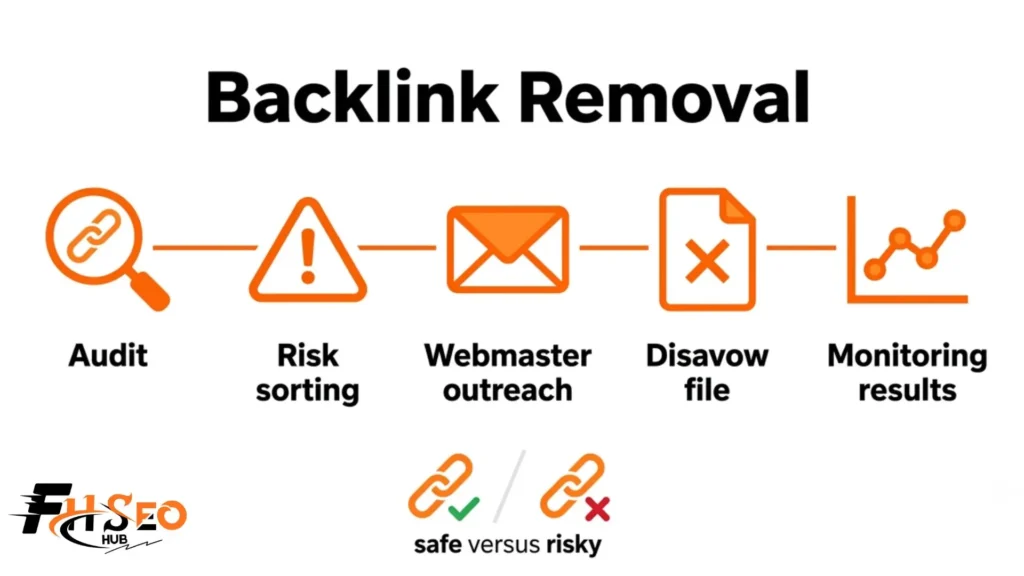
1. Audit your full backlink profile
Pull your complete link list from Google Search Console and cross check it with a third-party tool for a fuller picture. Flag domains that look spammy, irrelevant to your niche, or built purely for link selling.
2. Sort links by actual risk
Not every flagged link deserves action. Prioritize links tied to a manual action, an obvious negative SEO pattern, or domains you recognize as risky from past outreach campaigns.
3. Contact the webmasters first
Send a short, polite request asking the site owner to remove the link. Google explicitly recommends this step before disavowing, since a genuine removal is cleaner than asking Google to ignore something that is still publicly visible.
4. Build and submit a disavow file for what remains
For links you could not get removed, create a plain text file listing each URL on its own line, or use domain:example.com to disavow an entire domain at once. Upload it through the disavow tool inside Google Search Console.
5. Monitor your results
Processing typically takes several weeks, often falling between two and twelve weeks depending on how often Google recrawls the sites involved. Check your rankings and traffic afterward rather than assuming the file worked instantly.
Tools That Make This Work Easier
A handful of tools cover most of what a backlink cleanup requires, from spotting toxic links to building the disavow file itself. Picking one you can use consistently matters more than picking the biggest name.
Ahrefs gives a detailed link profile with spam signals flagged clearly. Semrush includes a dedicated backlink audit tool that can generate a disavow file directly from its toxic link report. Moz offers a spam score metric that helps prioritize which domains deserve a closer look. Majestic adds a historical view of your link profile, useful for spotting when a spike of bad links first appeared. Running the same domain through two tools before deciding helps too, since spam scoring methods differ and a link flagged by one tool can look clean in another.
Common Mistakes That Make Backlink Removal Worse
A handful of avoidable mistakes turn a routine cleanup into a self-inflicted ranking drop. Watch for these before you submit anything to Google.
Disavowing an entire domain when only one page on that site is the actual problem wastes protection you might have needed elsewhere on that domain. Skipping webmaster outreach and jumping straight to disavowing looks fine short term but misses a chance for a cleaner, permanent removal. Treating every low-authority link as toxic is one of the most common errors, since authority and toxicity are not the same thing. Updating your disavow file constantly, instead of batching changes, also slows down how reliably Google processes it.
How Often Should You Audit Your Backlink Profile
Most sites benefit from a full backlink audit roughly once a month, with a lighter check whenever rankings shift unexpectedly. Consistent monitoring catches problems while they are still small and easy to fix.
New spammy links can appear at any time, whether from ongoing negative SEO or simple internet spam that has nothing to do with your site specifically. A monthly review, paired with alerts for sudden ranking or traffic changes, keeps you ahead of anything serious without requiring constant manual checking. A site that recently went through a cleanup or a manual action deserves weekly checks for the first month, then a return to the normal monthly rhythm once things settle.
Conclusion
Backlink removal protects the rankings you have already earned, but it only works when it targets the right links. Most sites need far less disavowing than they assume, since Google already ignores the bulk of low-quality links on its own. Save real action for manual actions, confirmed negative SEO, and links you know were built through risky tactics. Audit monthly, act selectively, and your backlink profile stays a source of strength rather than a recurring worry.
FAQs
This means eliminating a harmful link’s influence on your rankings, either by getting the link deleted from the source site or by telling Google to ignore it through a disavow file. Both approaches protect your site from spammy or manipulative links.
No. Disavowing only tells Google to ignore the link when evaluating your site. The link itself stays live on the other website unless that site’s owner takes it down separately.
No. Google recommends disavowing only for sites with a manual action, a clear negative SEO attack, or a history of manipulative link building. Most low-quality links are already ignored by Google’s own systems without any action from you.
Processing generally takes between two and twelve weeks, depending on how often Google recrawls the domains listed. Results are rarely visible immediately after submission.
Yes, through negative SEO, where someone else builds spammy links to your site on purpose. This is uncommon, but a disavow file is the standard fix once you confirm the pattern looks intentional rather than random.
Look for spammy anchor text, domains with no real content or audience, and sites built only to sell link placements. A single low-authority link from a small but real site is usually not a threat on its own.
Try manual outreach to the webmaster first, since a true removal is cleaner than a disavow. Reserve the disavow tool for links you cannot get taken down or for confirmed negative SEO and manual action situations.