What is Direct Traffic in SEO And How to Track It

Direct traffic is the Google Analytics channel for sessions with no identifiable source, no referrer, no UTM parameters, and no click ID. GA4 defaults the visit to Direct rather than leaving it unclassified. Direct is a default, not a real category, which is why a growing share of it traces back to broken tracking rather than someone genuinely typing your URL.
Most direct traffic content treats it as a mystery to accept. This guide treats it as a diagnostic problem with specific, fixable causes. HTTPS redirect chains, missing UTM tags, payment gateway redirects, and AI referrer stripping are among them, alongside the legitimate ways direct traffic genuinely grows.
What is Direct Traffic in Google Analytics?
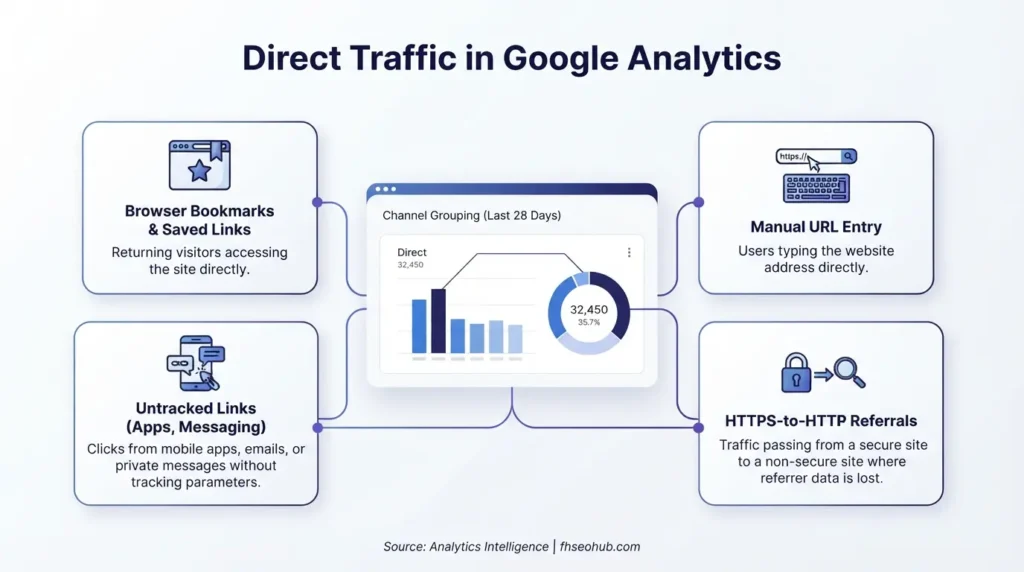
Direct traffic in Google Analytics is a default classification GA4 applies when a session arrives with no usable source signal. That means no referrer header, no UTM parameters, no Google click identifier, and no first-party cookie from a prior tagged visit. GA4 only falls back to Direct after every other attribution method has failed.
This last-resort logic matters because it means Direct isn’t a single traffic type. It’s everything left over once organic search, referral, paid, social, and email have been correctly identified. Some of what lands there is genuine, manual URL entry, bookmarks, brand recall. A meaningful share is tracking failure wearing a category label.
Direct vs. Organic vs. Referral Traffic: What’s the Difference?
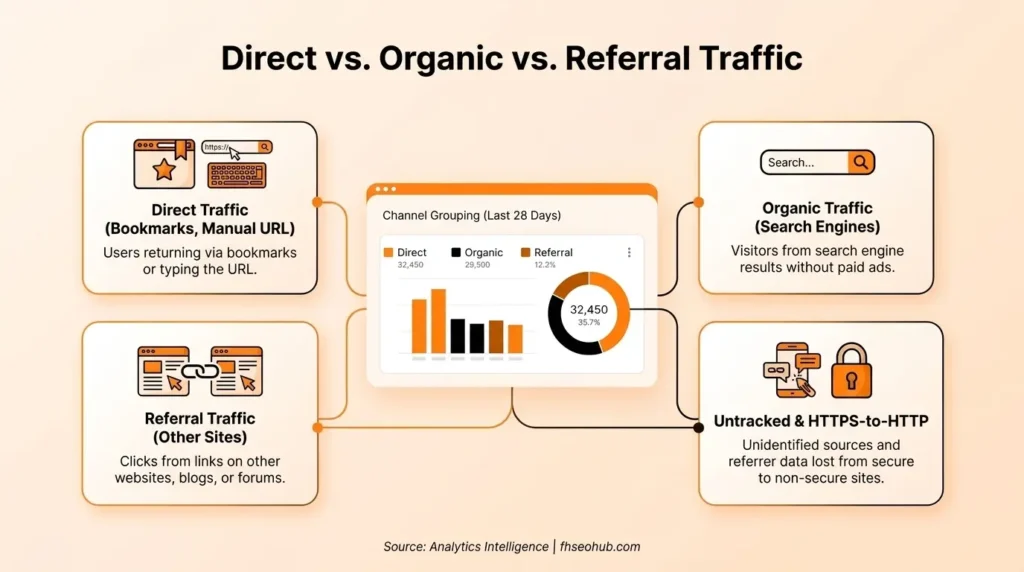
Organic search traffic arrives from unpaid search engine results with a search engine referrer GA4 can identify. Referral traffic arrives through a link on another website with that site’s domain passed as the referrer. Direct traffic arrives with neither signal present, regardless of what genuinely drove the visit.
The distinction matters practically. A session that should be referral or organic traffic, a link from a partner site, a citation in an AI-generated answer, can land in Direct purely because a technical step in the chain stripped the signal GA4 needed to classify it correctly.
Why is Direct Traffic Known as the “Catch-All” Bucket?
Direct traffic earns its “catch-all” reputation because GA4 routes every session it can’t confidently attribute into this bucket rather than leaving it unclassified. This mixes genuine direct visits with dark social shares, broken redirects, and stripped AI referrers into one undifferentiated number.
This blending is what makes raw Direct traffic numbers nearly useless on their own. A rising Direct segment could mean growing brand recognition, or it could mean a redirect chain broke last month and nobody noticed. The two explanations require completely different responses, and the top-line number alone can’t tell you which one you’re looking at.
Where to Find and Analyze Direct Traffic Data (GA4)
Direct traffic data lives in GA4’s Traffic Acquisition report under Reports, Acquisition, filtered to the Direct channel, showing session count, engagement rate, and conversions attributed to this bucket specifically. Cross-reference this against Google Search Console data to catch cases where Direct sessions correlate suspiciously with organic impressions that should have been attributed elsewhere.
Navigating the Traffic Acquisition Report
The Traffic Acquisition report groups sessions by Default Channel Grouping, with Direct appearing as one row among Organic Search, Referral, Paid Search, and the rest. Drill into the Direct row specifically and segment by landing page, since a Direct session landing on your homepage reads very differently than one landing on a specific blog post three levels deep.
Analyzing User Behavior and Intent from Direct Visitors
Analyzing Direct visitor behavior means comparing bounce rate, session duration, and conversion rate against other channels. Genuine direct visitors, people who know your brand and typed your URL deliberately, typically show stronger engagement than a broken-tracking visit that happens to land in the same bucket. A Direct segment with unusually high bounce rate on deep, unbookmarkable URLs is a tracking problem, not a brand-recognition win.
The Positive Causes of Direct Traffic
Genuine direct traffic reflects real user behavior GA4 correctly can’t attribute to any external source, and these causes are worth distinguishing clearly from the tracking failures covered later.
Manual URL Entry and Browser Bookmarks
Manual URL entry and bookmarks are the textbook case of legitimate direct traffic: a user typing your domain from memory or clicking a saved bookmark. Both genuinely carry no referrer data since no external page was involved in the navigation. This traffic typically lands on the homepage or a small set of frequently-revisited pages.
Offline Marketing and Word-of-Mouth
Offline marketing, print ads, podcast mentions, in-person referrals, and word-of-mouth recommendations drive genuine direct traffic since there’s no digital referrer to pass regardless of how effective the campaign was. This is one of the few traffic sources GA4 structurally cannot attribute more precisely without a workaround like a dedicated vanity URL or QR code tracking parameter.
Brand Recognition and Repeat Customers
Brand recognition and repeat customer visits show up as direct traffic when a high-intent visitor who already knows your brand navigates straight to your site rather than searching for it again. This is genuinely valuable traffic. It reflects real brand awareness, and high-intent visitors with existing brand trust convert at meaningfully better rates than cold traffic from any acquisition channel.
The Negative Causes (Why Traffic Gets Misattributed as Direct)
Misattributed traffic is the larger, less understood share of most sites’ Direct numbers, and each cause below has a specific, diagnosable mechanism rather than being an unexplainable black box.
The Impact of “Dark Social” (Private Messaging & Email)
Dark social, links shared through private messaging apps, Slack, Discord, and direct messages, strips referrer data before a click ever reaches your site, since these platforms don’t pass the same browser referrer a public webpage link would. This overlaps with the same visibility gap that makes answer engine optimization hard to measure. This traffic is genuinely earned, someone shared your content because they found it valuable, but it shows up indistinguishable from a typed URL.
Isolate likely dark social sessions by segmenting Direct traffic landing on specific inner pages rather than the homepage. A person typing a URL from memory rarely lands on a random blog post by coincidence.
Missing or Broken UTM Campaign Parameters
Missing or broken UTM parameters send email, social, and campaign traffic straight into Direct. GA4 has no other way to identify a link’s true source once the tracking parameters that would have flagged it are absent. This is the single most preventable cause on this list, and the easiest to audit for.
Audit every outbound campaign link for consistent utm_source, utm_medium, and utm_campaign tagging. Treat an untagged link in a newsletter or paid social post as a defect, not a minor oversight, since the resulting misattribution compounds every time that link gets clicked.
HTTP to HTTPS Migration and Cross-Protocol Traffic
An HTTPS-to-HTTP hop anywhere in a redirect chain strips referrer data, even when the final destination is secure. Browsers don’t pass referrer information from a secure page to an insecure one, for security reasons. The safe combinations, HTTP to HTTPS, HTTP to HTTP, and HTTPS to HTTPS, all preserve the referrer correctly. Only the HTTPS-to-HTTP direction breaks it.
| Redirect Path | Referrer Preserved? |
| HTTP → HTTPS | Yes |
| HTTP → HTTP | Yes |
| HTTPS → HTTPS | Yes |
| HTTPS → HTTP | No, referrer stripped |
This most commonly affects sites with an incomplete migration. An old partner link might still point to a pre-migration HTTP URL, or a third-party embed might still call an HTTP endpoint before redirecting into the HTTPS site.
Improper Redirect Chains and Missing Tracking Codes
Redirect chains, a URL redirecting to another redirect before reaching the final page, risk dropping query string parameters, including UTM tags, at any hop in the sequence. A missing Google Tag Manager container on a landing page means no tracking fires at all, regardless of how clean the traffic source genuinely was. Vanity URLs increase this risk specifically, since they require an extra redirect hop most standard links don’t need.
Payment gateway redirects deserve specific mention here. A customer bouncing to PayPal, Stripe, or a regional payment processor and back to your order confirmation page commonly loses the original session’s source data unless that payment domain sits on GA4’s referral exclusion list. Ecommerce sites frequently see conversion events misattributed to Direct purely because of this gap.
Checklist: How to Fix Tracking Issues and Minimize Unwanted Direct Traffic
Fixing tracking-related Direct inflation means auditing UTM tagging discipline, redirect hygiene, and Google Tag Manager configuration systematically, since these three areas account for most preventable misattribution.
Implementing Proper UTM Tagging for Email and Social
Tag every email, social, and paid campaign link with consistent UTM parameters before it goes live, not after a reporting gap gets noticed. Build UTM tagging into your content calendar and campaign checklist as a required field, since inconsistent tagging is the most common, most preventable cause of inflated Direct traffic on this entire list.
Fixing Server-Side 301 Redirects
Use 301 redirects exclusively for any permanent URL change, and flatten every redirect chain to a single hop pointing directly at the final HTTPS destination. Verify that query string parameters, including UTM tags, survive the redirect intact, since a technically correct 301 can still silently strip parameters if it’s not configured to preserve them.
Auditing Google Tag Manager and Analytics Setup
Audit Google Tag Manager and GA4 configuration for missing containers on new landing pages. Confirm correct cross-domain tracking settings under Configure Your Domains for any site spanning multiple domains or subdomains, and check for a complete referral exclusion list covering payment processors and any other domains your users pass through mid-session. Run this audit whenever you launch a new domain, subdomain, or payment integration, not just as an annual review.
How to Legitimately Increase Direct Traffic to Your Website
Growing genuine direct traffic means building enough brand recognition that people seek you out by name, not chasing a vanity metric by fixing tracking gaps alone.
Earning Brand Mentions and Digital PR
Earning brand mentions through genuine digital PR and press coverage builds the kind of brand recall that eventually shows up as direct traffic. Someone who reads about your brand in a trusted publication often searches or types your domain directly rather than clicking through immediately. This is a slower, compounding effect, not an instant traffic lever.
Driving Product-Led Growth and Offering Free Tools
Product-led growth and free tools give people a genuine reason to bookmark and return to your site directly. A useful, ungated tool builds habitual, repeat direct visits in a way content alone rarely does. A tool that solves a specific, recurring problem earns direct return visits long after the first discovery.
Leveraging Retargeting Ads to Build Brand Recall
Retargeting ads reinforce brand recall among people who’ve already visited your site, increasing the odds a previous visitor returns by typing your domain directly rather than searching again. This works specifically because retargeting reaches an audience with existing familiarity, not cold traffic building recognition from scratch.
Conclusion: Is Direct Traffic the Best Kind of Traffic?
Direct traffic isn’t inherently the best or worst kind of traffic, it’s a mixed signal that needs decomposition before it means anything. Genuine direct visits, high-intent, brand-aware, often high-converting, are worth building deliberately through digital PR, product-led growth, and retargeting. The misattributed share, dark social, broken UTMs, HTTPS redirect chains, stripped AI referrers, is worth auditing and fixing, not celebrating as brand strength it doesn’t represent. Segment your Direct traffic by landing page and engagement before drawing any conclusion from the number alone, since the same total can hide two entirely different stories.
FAQs
A sudden increase often reflects a tracking problem rather than genuine growth. The most common causes are a broken redirect chain, a recently changed link on a major referring site that dropped UTM parameters, or an HTTPS-to-HTTP hop introduced by a migration or third-party integration. Check whether the increase concentrates on deep page URLs rather than the homepage, which points toward misattribution.
Neither inherently. Genuine direct traffic reflects strong brand recognition and often converts well. A large share of most sites’ Direct numbers traces back to tracking failures that hide real organic, referral, or social performance rather than representing brand strength.
Add payment gateway domains, PayPal, Stripe, Klarna, and any regional processors your checkout uses, to GA4’s referral exclusion list under Admin, Data Streams, Configure Tag Settings. This prevents GA4 from treating the return trip from the payment page as a new session with no source.
Yes. Links shared through private messaging apps, Slack, Discord, and direct messages strip referrer data before the click reaches your site. This traffic lands in Direct even though it was genuinely earned through someone sharing your content.
Not automatically, but you should segment it before deciding. High direct traffic concentrated on your homepage with strong engagement likely reflects genuine brand recognition. High direct traffic spread across deep, unbookmarkable URLs with poor engagement usually points to a tracking or redirect problem worth auditing.