
Infographic Link Building Strategy: Embed Codes, Promotion, Niches & Results

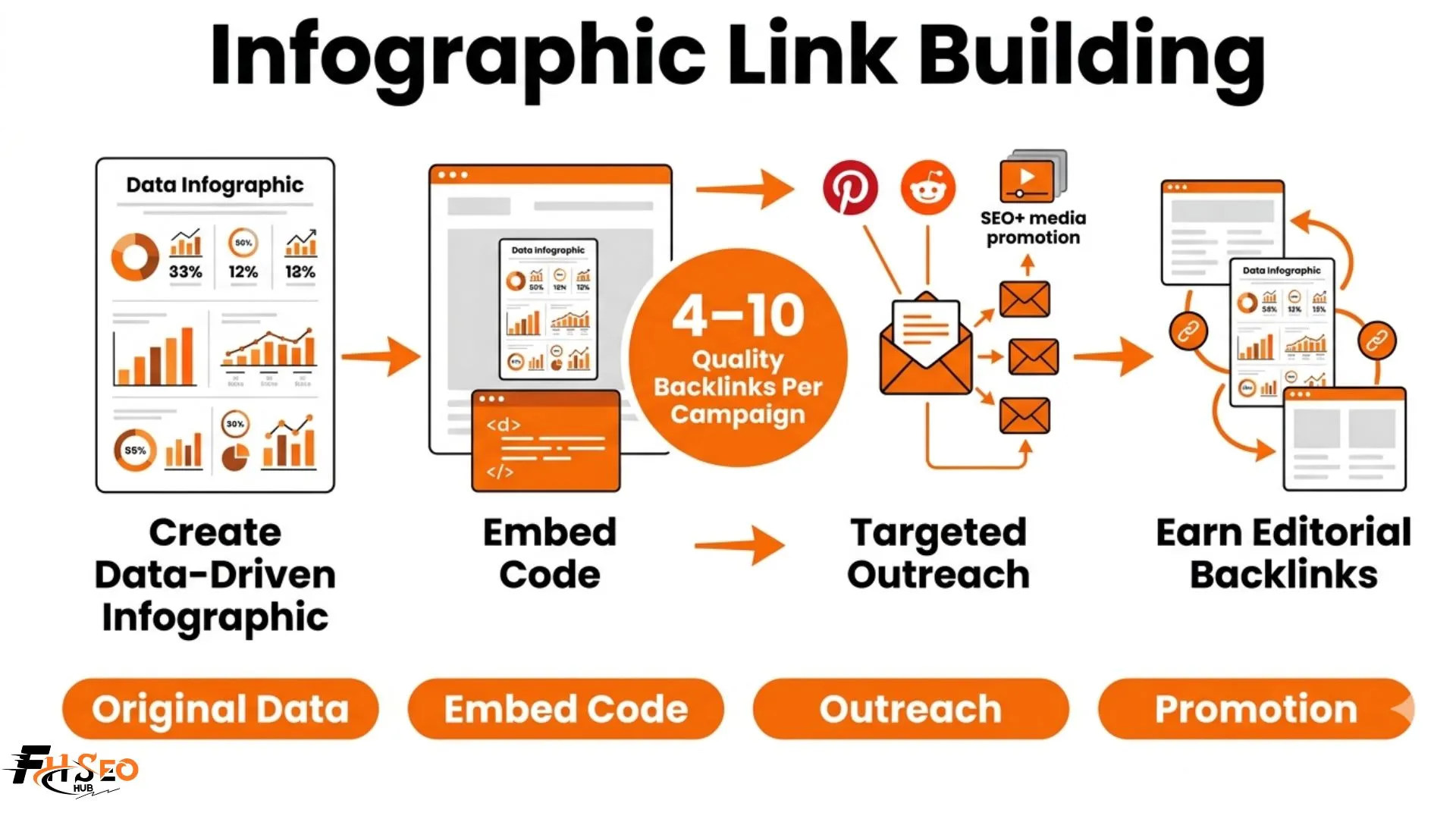
A complete infographic link building strategy combines four sequential actions: create an original data-driven infographic, publish it with an optimized embed code, run targeted outreach to 30 to 50 qualified sites and amplify through secondary promotion channels. A well-executed campaign earns 4 to 10 quality backlinks per infographic. Campaigns using all four steps consistently earn 15 to 30 backlinks from a single asset.
Most infographic campaigns stop at email outreach and wonder why results are mediocre. The creation and outreach are solid but the strategy layer is missing: no embed code, no secondary promotion, no niche validation, and no realistic benchmark to measure success against.
How to build backlinks with infographics? A step by step guide
A complete infographic link building strategy runs four steps in sequence. Most campaigns execute steps one and three and skip steps two and four entirely, which explains why the median campaign underperforms against its potential.
Step 1: Create an original data-driven infographic
The infographic must contain original data that creates citation dependency: findings from a named survey, a proprietary dataset or a comprehensively compiled statistic roundup that fills a genuine gap. Generic infographics summarizing publicly available data earn far fewer links because publishers have no structural reason to credit your source.
Step 2: Publish with an embed code on your own site
This step is skipped by a significant number of infographic campaigns, and it directly reduces link earning potential. An embed code is the mechanism that makes sharing frictionless. Without one, a publisher who wants to use your infographic must manually write attribution, find your URL and create the link themselves. Most won’t. With a one-click embed code directly below the infographic, the entire process takes 10 seconds.
Place the embed code in a clearly labeled box immediately below the infographic with a “Copy embed code” instruction. The code itself must be visible and functional without any JavaScript interaction required.
Step 3: Run targeted outreach to 30 to 50 qualified sites
Personalized outreach to topically relevant sites with Domain Rating above 30 and verified organic traffic produces the majority of editorial backlinks. Mass submission to infographic directories does not produce meaningful link equity in 2026. A 50-email targeted outreach campaign with strong personalization and a data-driven infographic typically earns 4 to 10 backlinks.
Step 4: Promote across secondary channels to amplify reach
Secondary channel promotion extends the discovery surface area beyond your direct outreach list. Pinterest, Reddit, niche communities and journalist databases each reach audiences that your email list does not. Campaigns using all four promotion channels earn 2 to 3 times more backlinks than outreach-only campaigns over the full 3 to 6 month result accumulation window.
What is an embed code and how does it work for infographic link building?
An embed code is a short HTML snippet that other websites paste into their pages to display your infographic. It automatically includes a backlink to your original source page as part of the code structure, which means every publisher who embeds your infographic through the code generates a backlink without requiring any additional action.
A correctly formatted embed code contains four elements: the image source URL pointing to your hosted infographic file, a hyperlink back to your infographic page, keyword-relevant anchor text inside that hyperlink and an alt text description of the image content for accessibility and image search indexing.
How to write an embed code that includes a backlink to your page
Here is a working embed code template:
html
<a href=”https://yoursite.com/your-infographic-page/”>
<img src=”https://yoursite.com/images/your-infographic.png”
alt=”[Topic] Infographic by [Your Brand]”
width=”800″ />
</a>
<p>Source: <a href=”https://yoursite.com/your-infographic-page/”>
[Keyword-Relevant Anchor Text] | Your Brand Name</a></p>
The anchor text in the source line is where most practitioners leave performance on the table. Using generic anchor text like “via [Your Brand]” misses a direct keyword signal opportunity. Using descriptive keyword-relevant anchor text that matches your target query tells Google what the destination page covers every time someone embeds the code.
Embed code anchor text optimization is a gap concept most competitors miss entirely. The anchor text embedded in your embed code becomes the default attribution text across every site that uses it. If 30 publishers embed your infographic using the same code, 30 referring domains will use identical anchor text. Designing that anchor text deliberately around a partial match keyword phrase rather than a brand-only reference adds meaningful topical signal to your backlink profile at scale.
Where to place the embed code on your infographic page
Place the embed code in a text box directly below the infographic, labeled clearly with “Share this infographic” or “Embed this infographic on your site.” The box should contain the full HTML code in a visible, selectable field. Test it across multiple browsers to confirm it renders correctly when pasted into a WordPress, Squarespace, or custom CMS page.
What niches work best for infographic link building?
Health, finance, technology and education consistently produce the highest infographic link acquisition rates because they share one characteristic: abundant complex data that publishers regularly need to explain visually to their audiences.
High-performing niches: health, finance, technology, education
Health and medical infographics earn strong backlinks from both consumer health publishers and medical professional resources. Statistics on conditions, treatment outcomes, and lifestyle factors are cited constantly by health content writers who need credible visuals to support complex claims.
Finance infographics covering interest rate comparisons, cost-of-living statistics, and investment data earn links from personal finance blogs, news sites3 and fintech publications. The data changes regularly, which creates opportunities for annual refresh campaigns.
Technology infographics covering adoption statistics, platform comparisons, and process diagrams earn links from tech blogs, SaaS review sites, and industry publications. Educational infographics on learning statistics, study process diagrams, and curriculum breakdowns earn links from academic resource sites, teacher blogs, and e-learning platforms.
Why data-rich niches produce the most linkable infographics
Data density creates citation dependency. A niche with abundant original data that is genuinely difficult to present in prose form produces infographics that publishers embed because the visual representation is more useful to their readers than a paragraph of statistics. The editorial decision to embed is driven by reader value, not by the aesthetics of the infographic.
Infographic co-citation value compounds in data-rich niches over time. When multiple authoritative sources in a niche reference your infographic as a data source, Google’s entity recognition systems begin associating your domain with authoritative coverage of that topic. This topical authority signal reinforces the direct link equity from each backlink, producing a compounding benefit that generic link building tactics do not replicate.
Niches where infographic link building is difficult and why
Fashion, food, travel photography, and lifestyle niches are difficult for infographic link building because the dominant content format is photography and video, not data visualization. Publishers in these niches do not typically embed data infographics because their audiences engage with images of products and experiences, not statistical charts.
Highly specialized B2B niches with minimal publishing ecosystems present a different challenge: if no editorial websites publish content in your niche, there are no target sites for outreach regardless of infographic quality.
How long does infographic link building take to show results?
First backlinks from a targeted outreach campaign typically arrive within 2 to 4 weeks. Ranking improvements from those links take an additional 4 to 12 weeks depending on keyword competition and the authority of linking sites. Full campaign results accumulate over 3 to 6 months. Any infographic earning more than 15 backlinks from a single campaign is performing exceptionally.
The realistic timeline from infographic creation to first backlinks
The first responses to a well-executed outreach campaign arrive within the first week. Actual published embeds with live backlinks typically appear 2 to 4 weeks after the campaign launches, accounting for editorial review cycles, publication schedules and internal approval processes at larger sites.
Infographics backed by original survey data tend to generate faster initial responses because journalists and editors recognize the citation dependency immediately. An editor who needs to cite a statistic wants to publish quickly, which reduces the typical editorial lag.
How long before infographic backlinks affect rankings
New backlinks from infographic placements typically begin affecting rankings 4 to 12 weeks after the links go live, depending on how quickly Google re-crawls the linking pages and processes the new authority signals. Pages in positions 5 to 15 with existing topical relevance respond faster than pages with no established authority.
Why patience is required and what to track in the meantime
The practitioner insight that timelines always underestimate: infographic campaigns have a long tail that outreach-only tracking misses. The most valuable links in an infographic campaign often arrive 3 to 6 months after launch, not in the first two weeks, because they come from publishers who discovered the infographic through Google Image Search or Pinterest rather than through your direct outreach.
Track infographic campaign results through three metrics: new referring domains to the infographic URL (weekly in Ahrefs), organic impressions for the infographic page (Google Search Console), and infographic embed mentions without backlinks (Google Alerts). The third metric identifies unlinked embeds for reclamation outreach, which consistently adds 10 to 20 percent more backlinks to a campaign’s total.
Conclusion
A complete infographic link building strategy produces consistent results only when all four steps run together: original data infographic creation, an optimized embed code with keyword-relevant anchor text, targeted 30 to 50 site outreach and secondary promotion through Pinterest, Reddit and HARO. Stopping at outreach caps your result ceiling at a fraction of the campaign’s potential.
The realistic success benchmark for a well-executed infographic link building strategy is 4 to 10 quality backlinks per campaign. Exceptional campaigns with original survey data and consistent multi-channel promotion earn 15 to 30. These are reusable assets. An infographic published today continues earning links for months or years through ongoing image search discovery and periodic refresh campaigns.


