10 Best On-Page SEO Tools in 2026

On-page SEO covers everything on a page itself that affects search engine rankings and organic traffic. This includes title tags, meta descriptions, heading structure, keyword optimization, internal linking, and content depth measured against what’s already ranking. On-page SEO tools automate the auditing and scoring work that would otherwise take hours per page manually.
The right tool matters because on-page SEO checkers differ meaningfully in what they measure. A tool built for content scoring against SERP competitors solves a different problem than a WordPress plugin checking title tags and schema markup. Picking the wrong one for your actual bottleneck wastes both budget and time.
How On-Page SEO Tools Improve Website Performance
On-page SEO tools improve website performance by surfacing specific, actionable gaps: missing semantic keywords, thin content depth, broken links, slow page speed, and technical SEO issues. These are gaps that would otherwise require manually cross-referencing a page against every top-ranking competitor.
This matters most at scale. A single page audit takes minutes by hand. Auditing fifty or a hundred pages against current SERP competitors and Core Web Vitals data isn’t realistic without software handling the comparison work automatically.
10 Best On-Page SEO Tools in 2026
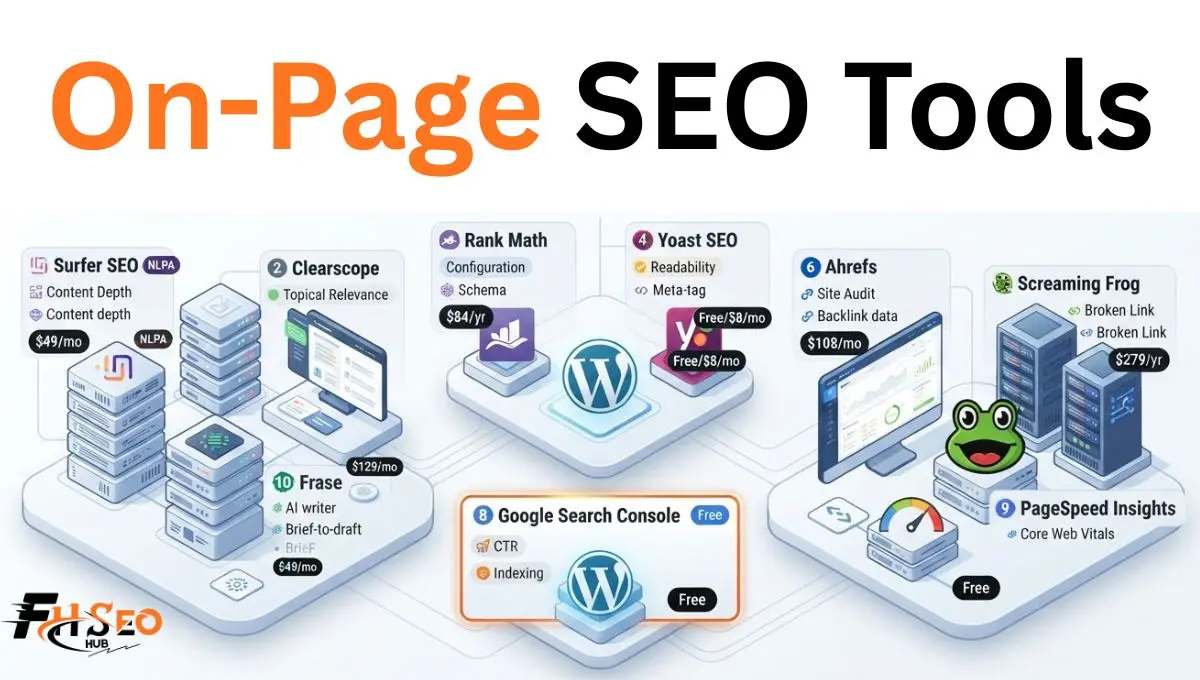
These ten tools split across content optimization, technical auditing, and CMS-native plugins. The right stack usually combines at least one from each category rather than relying on a single tool for everything.
1. Surfer SEO
Surfer SEO scores content against top-ranking pages for a target keyword using NLP-based analysis across more than 100 factors. It then guides you toward the semantic keywords and content depth those competitors share. It remains the most commonly recommended content optimization tool for SEO-led teams specifically.
Pricing runs Discovery at $49 a month, Standard at $99, Pro at $182, and Peace of Mind at $299. All tiers are billed yearly with roughly 20 percent savings over monthly rates where monthly billing is still offered. The Content Editor updates guidance in real time as you write, though the tool is prescriptive enough that some writers find it constrains natural phrasing if followed too literally.
2. SEMrush On-Page SEO Checker
SEMrush’s On-Page SEO Checker pulls ideas directly from Google Search Console and top-ranking competitors. It covers keyword optimization, content gap analysis, and technical SEO issues within the broader SEMrush ecosystem rather than as a standalone product.
This makes the most sense for teams already paying for SEMrush’s keyword research, competitor analysis, and rank tracking features. The On-Page SEO Checker and Writing Assistant come bundled into existing plans starting around $139 a month. Pricing climbs toward $250 for the Guru tier that includes deeper content and writing tools. Buying SEMrush purely for on-page checking specifically is rarely the most cost-effective path if you don’t need the rest of the suite.
3. Rank Math
Rank Math is a WordPress SEO plugin handling title tags, meta descriptions, schema markup, and XML sitemaps, with a built-in on-page SEO checker directly inside the WordPress editor. It also ships with a genuinely generous free tier covering most small-site needs.
The Pro tier runs roughly $84 a year, cheap enough that cost rarely factors into the Rank Math versus Yoast decision. The real differentiator is configurability. Rank Math ships more modules and finer control over schema types and redirect handling than Yoast does. Agencies managing varied client sites tend to value this more than solo bloggers do.
4. Yoast SEO
Yoast SEO is the longest-established WordPress SEO plugin, covering readability analysis, focus keyword optimization, meta descriptions, and title tags. It offers a simpler, more opinionated interface than Rank Math’s deeper configuration options.
Pricing runs free for the core plugin with Premium around $8 a month. The tool’s real strength is its readability analysis specifically, still considered stronger and more consistent than most competing plugins. Teams that want fewer decisions and a proven, stable plugin generally prefer Yoast, while teams wanting granular schema and redirect control tend to land on Rank Math instead.
5. Clearscope
Clearscope generates content briefs and grades drafts against topical relevance and entity coverage rather than raw keyword density. It positions itself specifically for editorial teams and enterprises handing content off to writers who aren’t SEO specialists themselves.
Essentials starts at $129 a month, meaningfully above Surfer’s entry price. Clearscope’s unlimited-user model on higher tiers often works out cheaper per seat for larger content teams despite the steeper starting cost. The interface trades some of Surfer’s prescriptive depth for a cleaner, less technical experience non-SEO writers can use without much onboarding.
6. Ahrefs
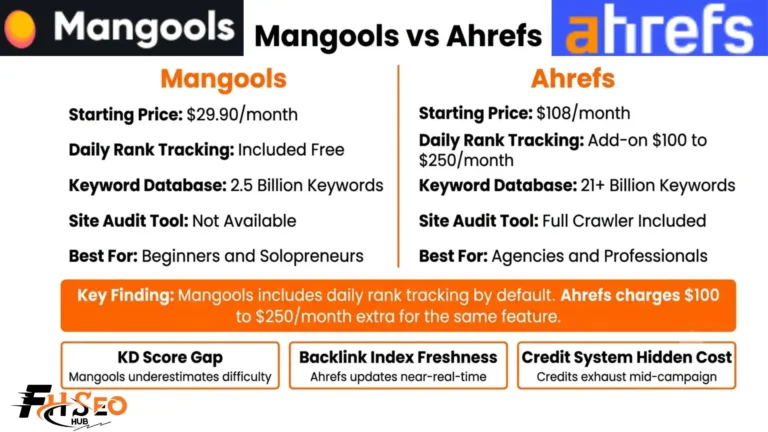
Ahrefs covers on-page auditing through its Site Audit tool, alongside its better-known backlink analysis, competitor analysis, and rank tracking. This makes it a genuine all-in-one platform rather than a dedicated on-page content scorer.
Pricing starts around $108 a month. Ahrefs earns its place on this list specifically for teams already using it for backlink and competitor research. They want on-page technical checks in the same platform rather than adding a separate tool. It doesn’t match Surfer or Clearscope’s content-scoring depth, but it covers technical SEO issues, broken links, and duplicate content detection well.
7. Screaming Frog
Screaming Frog crawls a site to surface technical SEO issues at scale: broken links, duplicate content, missing meta descriptions, redirect chains, and title tag problems across every URL. It does this rather than scoring individual pieces of content against competitors.
The free version crawls up to 500 URLs, and the paid license runs about $279 a year. That’s cheap relative to most content optimization subscriptions given how much manual auditing it replaces. This is the tool for technical on-page audits specifically, not content scoring. Pairing it with Surfer or Clearscope covers both sides of on-page SEO that neither tool handles alone.
8. Google Search Console
Google Search Console provides free, first-party data on click-through rate, indexing status, and Core Web Vitals. It shows which queries genuinely drive impressions and clicks to specific pages, data no third-party tool can fully replicate since it comes directly from Google.
Every on-page SEO workflow should start here regardless of what paid tools sit alongside it. Search Console reveals genuine performance gaps: a page ranking but not converting clicks, a page with a Core Web Vitals issue. Content-scoring tools built around competitor comparison simply can’t surface this on their own.
9. PageSpeed Insights
PageSpeed Insights measures Core Web Vitals and page speed for both mobile and desktop, free, directly from Google. It flags the specific technical issues slowing a page down rather than just providing an overall score with no actionable detail.
Page speed remains a genuine on-page ranking factor and user experience issue simultaneously. PageSpeed Insights is the most direct way to diagnose it without adding another paid subscription. The data comes from the same source Google itself uses to evaluate Core Web Vitals.
10. Frase
Frase combines SERP research, content brief creation, and an AI writer into one platform at a meaningfully lower price point than Surfer or Clearscope. It positions itself as the budget-conscious all-in-one option for teams that need briefs and drafts, not just scoring.
Starter pricing begins around $49 a month, matching Surfer’s entry tier while adding brief-to-draft workflow Surfer doesn’t include at that price. Frase’s content scoring is generally considered less rigorous than Surfer’s NLP-based analysis, a real trade-off for teams prioritizing speed and budget over maximum optimization depth.
Comparison Table For On-Page SEO Tools
Beyond these ten, a few additional platforms round out the category worth a brief mention. SE Ranking bundles content scoring with rank tracking and site audits at a lower combined cost than paying for Surfer plus a separate tracker separately. MarketMuse focuses on enterprise-scale content strategy and topic modeling rather than single-page scoring, and Moz Pro covers on-page recommendations alongside its better-known domain authority and keyword tracking features.
| Tool | Best For | Starting Price | Free Option |
| Surfer SEO | Real-time content scoring | $49/mo | No |
| SEMrush On-Page SEO Checker | Teams already on SEMrush | ~$139/mo (bundled) | No |
| Rank Math | WordPress, configurability | Free / ~$84/yr | Yes, generous |
| Yoast SEO | WordPress, readability | Free / ~$8/mo | Yes |
| Clearscope | Editorial teams, enterprises | $129/mo | No |
| Ahrefs | All-in-one with on-page audits | ~$108/mo | No |
| Screaming Frog | Technical audits at scale | Free / ~$279/yr | Yes, up to 500 URLs |
| Google Search Console | First-party performance data | Free | Yes, fully free |
| PageSpeed Insights | Core Web Vitals diagnostics | Free | Yes, fully free |
| Frase | Budget briefs and drafting | $49/mo | No |
How to Choose the Right On-Page SEO Tool
Choosing the right on-page SEO tool depends on your actual bottleneck. Content scoring against competitors, technical site-wide auditing, keyword research depth, and CMS-native title tag and schema management are all different problems. No single tool on this list handles all three equally well.
WordPress sites with a limited budget should start with Rank Math or Yoast alongside the free tier of Google Search Console and PageSpeed Insights. These cover the technical fundamentals at no meaningful cost. Teams publishing content regularly and competing for competitive keywords benefit most from Surfer or Clearscope specifically. Choose Surfer for a lower entry price and more prescriptive guidance, or Clearscope for a cleaner interface better suited to non-SEO writers. Agencies managing many client sites typically need Screaming Frog for technical audits at scale, regardless of which content-scoring tool they pair it with. No content optimization platform replaces a full-site crawl for catching broken links and duplicate content across dozens of pages.
Budget-conscious teams priced out of Surfer or Clearscope’s monthly cost have a real alternative worth knowing. NeuronWriter offers similar NLP-based content scoring starting around $19 a month, a fraction of Surfer’s entry tier, though with a smaller feature set and less brand recognition. PageOptimizer Pro is another budget-tier option worth checking, built around TF-IDF keyword weighting rather than the broader NLP models Surfer and Clearscope use. This suits teams wanting a simpler, more literal keyword-matching approach. Whichever tool you choose, weigh its AI content optimization capabilities alongside traditional scoring, since AI search visibility increasingly factors into which platform makes sense long term.
Conclusion
The best on-page SEO tools in 2026 split cleanly into three categories: content scoring, technical auditing, and CMS-native plugins. Most serious content operations need at least one tool from each rather than a single all-in-one solution. Start with the free tier of Google Search Console and PageSpeed Insights regardless of budget, since first-party performance data should inform every other tool’s output. Add Surfer, Clearscope, or a lower-cost alternative like Frase or NeuronWriter based on actual content volume and budget. Pair whichever you choose with Screaming Frog for technical audits once site size makes manual crawling impractical.
FAQs
Google Search Console and PageSpeed Insights are both fully free and provide first-party data no paid tool fully replicates. For WordPress specifically, Rank Math’s free tier covers most on-page fundamentals without a paid upgrade.
It depends on the team. Surfer offers a lower entry price and more prescriptive, SEO-specialist-focused guidance. Clearscope’s cleaner interface and unlimited-user pricing on higher tiers tend to suit editorial teams and enterprises handing content to non-SEO writers.
Often yes, since they solve different problems. Rank Math handles WordPress-specific technical elements like schema markup and title tags, while Surfer scores content depth and semantic keyword coverage against SERP competitors, a comparison Rank Math doesn’t perform.
Costs range from free, for Google Search Console, PageSpeed Insights, and Rank Math or Yoast’s core plugins. Paid content-scoring platforms like Clearscope or Surfer’s higher tiers run $129 to $300 a month, depending on team size and content volume.
Increasingly, yes. Several current tools now track AI search visibility and citation readiness alongside traditional content scoring. This capability varies significantly by tool and remains a newer, less standardized feature across the category.