Keyword in URL SEO: Does It Help Rankings and How to Do It Right?

Keywords in URL SEO do help rankings, but as a minor signal confirmed by Google itself. Including your target keyword in your URL slug improves how search engines understand your page, boosts click-through rates from search results by up to 45%, and quietly generates keyword-rich anchor text every time someone shares your link. The bigger opportunity is not the direct ranking lift but the compounding indirect benefits most SEOs overlook.
Most articles tell you to add keywords to your URLs and stop there. This one goes further. It explains the specific mechanism behind why URL keywords work, when changing existing URLs is actually worth the risk, and what the anchor text angle means for your link building strategy.
What Is Keyword in URL SEO and Why Do Search Engines Actually Care?
Keyword in URL SEO refers to placing your target keyword inside the URL slug of a web page so both search engines and users immediately understand what the page covers. When a search engine crawler encounters a URL, it runs a process called URL tokenization: breaking the URL path into individual words at each hyphen and using those words as one of many signals to assess page relevance.
The URL /seo-friendly-url-structure/ tells a crawler the same thing it tells a human. It does not need to read the body text first to get context. That early context signal, even if minor, feeds into how the page gets categorized and matched to search queries before any other on-page element gets analyzed.
What Did John Mueller and Matt Cutts Actually About Keywords in URLs?
Both of Google’s most quoted representatives confirmed the same thing from different angles. John Mueller called URL keywords a “very small ranking factor” in a 2016 webmaster hangout and later posted a tweet saying: “Keywords in URLs are overrated for Google SEO. Make URLs for users.” Matt Cutts agreed that keywords “help a little bit” in his own video on the topic while repeating that users should always come first.
The important thing to take from both statements is this: neither said URL keywords are useless. They said the direct ranking weight is small. That is different from saying there is no value, especially once you understand the indirect mechanisms that compound that small signal into something more meaningful.
How URL Keywords Become Automatic Anchor Text for Every Link You Earn
This is the angle almost nobody explains. When someone copies your URL and pastes it into a Reddit thread, a forum post, or a guest article without adding separate anchor text around it, your URL slug becomes the anchor text automatically. A URL like /keyword-in-url-seo/ generates the phrase “keyword-in-url-seo” as the backlink anchor for every unattributed link that gets copied and shared.
That means your URL slug choice is not just a formatting decision. It is a permanent link building decision. Every link your page earns without custom anchor text will carry the exact words you chose to put in your slug. For pages targeting competitive search terms, that automatic anchor text accumulation over time strengthens the keyword relevance signal far beyond what the direct URL ranking factor contributes on its own.
This is also why readable, keyword-focused URL slugs perform better when people link to your content organically. The URL itself communicates the topic to both the linking site’s readers and to Google when it evaluates that backlink’s context.
How Deep a Keyword Sits in the URL Path Changes How Much Signal It Sends
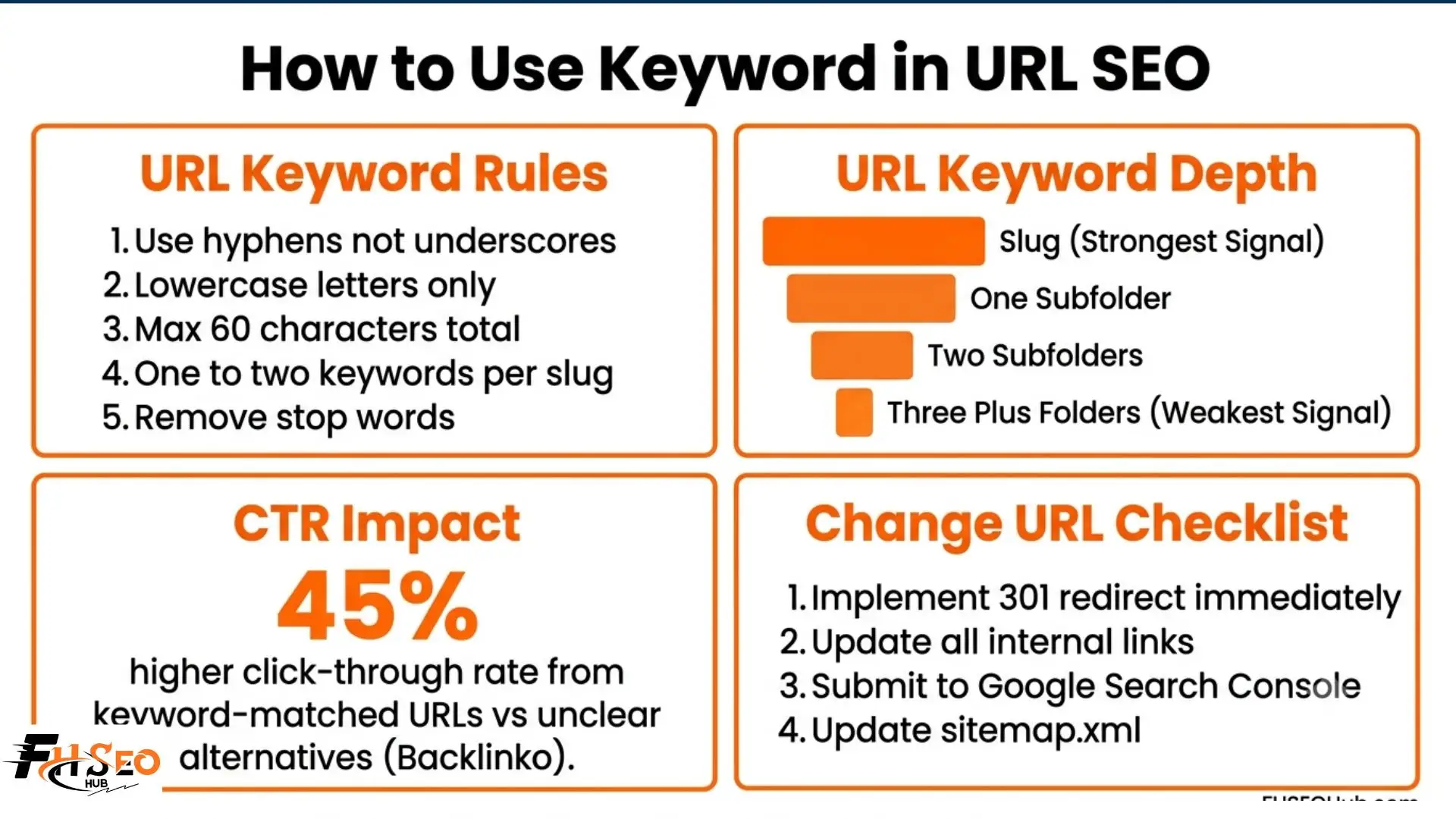
Not all keyword placements in a URL carry equal weight. The deeper a keyword sits in the URL path, the weaker the signal it sends. A keyword in the final URL slug like /seo-friendly-url/ carries the strongest relevance signal. The same keyword buried four folders deep at /site/resources/guides/2026/seo-friendly-url/ carries a noticeably weaker signal because it is diluted by the surrounding path.
When planning your URL hierarchy and site architecture, put your most important target keywords as close to the domain as your site structure practically allows. This keeps the signal clean and concentrated. For a blog, /blog/seo-tips/ is structurally better than /site/content/resources/articles/blog/seo-tips/. Limit folder depth to one or two levels and your keyword slugs will work harder with less effort.
How to Add Keywords in a URL without Keyword Stuffing
Adding keywords to a URL correctly takes about two minutes once you know the rules. Here is the process:
Step 1: Identify your target keyword first. Use a keyword tool like Ahrefs or Ubersuggest before writing the URL. Match the keyword to the search intent of the page. Transactional pages need buying-intent keywords. Informational pages need question or topic keywords.
Step 2: Strip the slug to its core. Take your page title and remove all stop words: the, and, of, in, or, but. These words add URL length without adding keyword clarity. A title like “The Complete Guide to SEO-Friendly URL Structure for Beginners” becomes /seo-friendly-url-structure/.
Step 3: Use hyphens, never underscores. Google treats hyphens as word separators during URL tokenization. Underscores are treated as word joiners, which means seo_friendly_url reads as one unrecognized string rather than three clear words. Always use hyphens.
Step 4: Keep it under 60 characters. Shorter URLs display fully in search results without truncation, especially on mobile screens. They are easier to share, easier to read, and less likely to get cut off in emails or social posts. Three to five words is usually the sweet spot.
Step 5: Use lowercase letters only. URL paths are case-sensitive on most servers. Mixing uppercase and lowercase can create duplicate content issues where /SEO-Friendly-URL/ and /seo-friendly-url/ both exist as separate indexable pages. Always stick to lowercase across every URL on your site.
Step 6: Limit keywords to one or two per slug. Using more than two keyword phrases in a single URL triggers keyword stuffing flags from Google’s spam policies. URLs like /best-top-cheap-seo-friendly-url-guide-tips-practices/ appear spammy to crawlers and reduce user trust in search results.
How URL Keywords Affect Click-Through Rate From Search Results
Google bolds matching search terms inside the URL when it displays your listing in search results. When a user searches “seo-friendly URL structure” and your URL reads /seo-friendly-url-structure/, those words appear highlighted in the search result, making your listing more visually prominent than a competitor showing /page?id=4821/.
Backlinko research found that keyword-matched URLs earn 45% higher click-through rates than unclear alternatives. That CTR improvement feeds back into rankings because Google uses engagement signals including click-through rate as part of its ranking evaluation. A cleaner, keyword-relevant URL slug can therefore improve your rankings twice: once directly as a minor ranking factor and again indirectly through improved CTR and user engagement behavior.
Should You Change an Existing URL to Add Keywords?
The answer depends entirely on what the page currently has working for it. Changing a URL requires a 301 redirect from the old address to the new one, which preserves most of the link equity but not all of it. There is always a recovery period during which rankings may dip before recovering to their new level.
Here is how to decide:
When you do change a URL, implement the 301 redirect immediately, update all internal links pointing to the old URL, submit the new URL through Google Search Console for re-indexing, and update your sitemap.xml file. Check for redirect chains, which happen when the old URL already redirected somewhere else, because chains slow down crawlers and lose additional link equity with each hop.
How Dynamic URLs and Query String Parameters Hurt Your URL Keyword Strategy
A dynamic URL like /products?id=8932&color=red contains no readable keywords and creates duplicate content problems when filters generate multiple unique web addresses for the same product page. Search engines may index each parameter variant separately, splitting link equity across identical content instead of consolidating it on one keyword-optimized primary URL.
For ecommerce sites with faceted navigation, where users filter by color, size, or price, apply canonical tags pointing every filtered URL back to the primary unfiltered category URL. This tells search engines which version to index. Block low-value filtered pages with robots.txt or noindex tags to protect your crawl budget and keep link equity flowing to your keyword-focused static URLs.
Do URL Keywords Work in AI Search Engines in 2026?
Yes, and this matters more than most URL SEO guides discuss. Google AI Overviews, Perplexity, and ChatGPT search all select pages to cite in AI-generated answers based partly on structural trust signals. Clean, keyword-relevant static URLs are structurally easier for these systems to parse and match to a query than dynamic URLs full of query string parameters.
A well-structured URL that matches the page topic with a clear keyword slug signals to AI search systems that the page is purposefully organized and trustworthy. As AI-powered search grows in 2026, the same practices that make URLs good for traditional search also make them more likely to earn citations in AI-generated responses.
Final Thoughts
Keyword in URL SEO is not a tactic worth obsessing over alone, but it is not one worth skipping either. The direct ranking signal is minor. The indirect compounding through anchor text, click-through rate, and AI search visibility makes it worth doing correctly from the start. Keep URL slugs short, keyword-focused, hyphen-separated, and lowercase. Make the change on new pages by default and evaluate existing page changes case by case based on the risk math. That combination delivers maximum benefit with minimum disruption.
FAQs
Yes. Keywords in URL help SEO as a confirmed minor ranking factor by Google. The direct ranking contribution is small but the indirect benefits through higher CTR and automatic keyword-rich anchor text generation make the total value significantly larger than the direct signal alone.
Identify your target keyword, remove stop words from your page title to create the slug, separate words with hyphens not underscores, use lowercase letters only, and keep total URL length under 60 characters. Use one to two keywords maximum per URL slug to avoid keyword stuffing flags.
Keep URL length between 50 and 60 characters for optimal SEO performance. Shorter URLs display fully in search results without truncation, are easier to share, and prevent link equity dilution from excessive padding words.
Only change existing URLs when the expected CTR gain clearly outweighs the link equity recovery period from the required 301 redirect. Pages with few or no backlinks are low risk to change immediately. High-traffic pages with strong link profiles should be changed cautiously or left alone.
Dynamic URLs with query string parameters are not automatically penalized but they harm keyword URL SEO by containing no readable target keywords and creating duplicate content issues when parameters generate multiple addresses for the same page. Convert dynamic URLs to static keyword-focused slugs where possible using URL rewriting.
Always use hyphens. Google treats hyphens as word separators during URL tokenization, reading each hyphenated segment as a distinct word. Underscores are treated as word joiners, which can cause entire hyphenated strings to be read as a single unrecognized term.


